EducationSoftwareStrategy.com
StrategyCommunity

Knowledge Base

Product

Community

Knowledge Base

TopicsBrowse ArticlesDeveloper Zone

Product

Download SoftwareProduct DocumentationSecurity Hub

Education

Tutorial VideosSolution GalleryEducation courses

Community

GuidelinesGrandmastersEvents
x_social-icon_white.svglinkedin_social-icon_white.svg
Strategy logoCommunity

© Strategy Inc. All Rights Reserved.

LegalTerms of UsePrivacy Policy
  1. Home
  2. Topics

KB20028: Grid property to scroll in case of data overflow for HTML for a report placed in a panel in a Report Services Document is not enforced in MicroStrategy Web


Community Admin

• Strategy


This article explains why the Grid property to scroll in case of data overflow for HTML for a report placed in a panel in a Report Services Document is not enforced in MicroStrategy Web 9.x.

SYMPTOM:
The ability to assign a scrolling property for a grid in case of data overflow in a panel in a Report Services Document is not enforced in Strategy Web 9.x
STEPS TO REPRODUCE:
To reproduce this issue in Strategy Tutorial, follow the steps below:
  • Create a report in Strategy Developer with attributes Customer, Customer Address and Customer City in the grid. Save and close the report.
  • In Strategy Web, create a Report Services Document and insert a panel in the document.
  • Add the report created in step 1 to the panel in the document.
  • From Format on the RSDoc toolbar select Properties and Formatting.
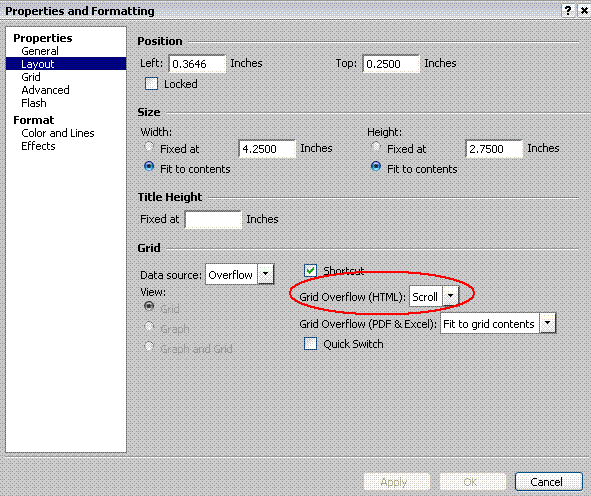
  • In the Layout section of the Formatting editor, set 'Grid overflow' for HTML to `Scroll` instead of the default `Clip` as shown in the screenshot below:
ka04W000000OgMdQAK_0EM4400000028R7.gif
  • Execute the document in Web.
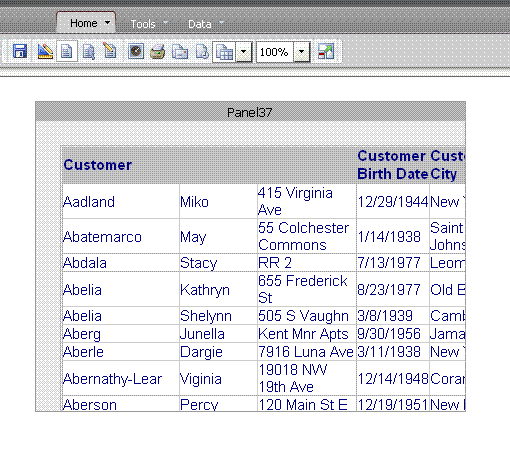
  • The ability to scroll is not implemented and the report in the panel is clipped as shown below:
ka04W000000OgMdQAK_0EM4400000028R9.gif

ACTION:
The grid overflow property will not prevent the grid from getting clipped. It will apply only if the grid content does not fit inside the grid container that has been allocated.


Comment

0 comments

Details

Knowledge Article

Published:

June 14, 2017

Last Updated:

June 14, 2017