Certain reports might need to apply different filter qualifications depending on prompt answers, or attribute elements in fact table rows. For example, a report might have the following requirements:
It is not sufficient to place the Country prompt and a Region filter in the report filter, because the qualification Region in (Northwest, Southwest) will always apply. For countries other than USA, this qualification and the prompt will be mutually exclusive and the report will return no data.
Instead of filtering on Region directly, its qualification may be written into an ApplyComparison expression, which uses a CASE statement to affect the condition's outcome.
Note: To create custom expression qualifications, the advanced qualification option must be enabled in the report designer's preferences in Strategy Desktop 8.x. This preference is located under the Tools menu > My Preferences > Editors tab > Filter Options, in which the first option, "Show advanced qualification," should be checked. With advanced qualifications enabled, double-clicking on the last line in the filter editor or report filter panel reveals the radio button to add an advanced qualification to the filter.

ApplyComparison ("(Case when #0 = 1 then #1 else 6 end) in (6, 7)", Country@ID, Region@ID)
This expression evaluates as follows:
Note: Many databases do not support Boolean values as the result of a CASE expression. The following alternative would not be legal, because "#1 in (6, 7)" is not valid in the THEN or ELSE portions of CASE syntax.
ApplyComparison ("(Case when #0 = 1 then #1 in (6, 7) else 1=1 end)", Country@ID, Region@ID)
The technique shown above, moving the comparison outside the CASE and having one branch the value known to be in the element list, avoids the SQL restriction.
The report definition places the ApplyComparison qualification in the report filter along with the Country prompt.
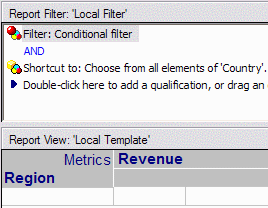
When the Country prompt is answered with USA, the report SQL is as follows. Only the REGION_ID branch of the CASE expression is relevant, because the prompt stipulates that only Country ID = 1 will count in the query.
select a12.REGION_ID REGION_ID,
max(a13.REGION_NAME) REGION_NAME,
sum(a11.TOT_DOLLAR_SALES) Revenue
from CITY_CTR_SLS a11
join LU_CALL_CTR a12
on (a11.CALL_CTR_ID = a12.CALL_CTR_ID)
join LU_REGION a13
on (a12.REGION_ID = a13.REGION_ID)
where ((Case when a12.COUNTRY_ID = 1 then a12.REGION_ID else 6 end) in (6, 7)
and a12.COUNTRY_ID in (1))
group by a12.REGION_ID
But, if the prompt is answered with "Web" as the country, the prompt contradicts the COUNTRY_ID = 1 condition and the Region ID is not used for filtering.
select a12.REGION_ID REGION_ID,
max(a13.REGION_NAME) REGION_NAME,
sum(a11.TOT_DOLLAR_SALES) Revenue
from CITY_CTR_SLS a11
join LU_CALL_CTR a12
on (a11.CALL_CTR_ID = a12.CALL_CTR_ID)
join LU_REGION a13
on (a12.REGION_ID = a13.REGION_ID)
where ((Case when a12.COUNTRY_ID = 1 then a12.REGION_ID else 6 end) in (6, 7)
and a12.COUNTRY_ID in (7))
group by a12.REGION_ID
select a11.ITEM_ID ITEM_ID | select a11.ITEM_ID ITEM_ID |
|
|
