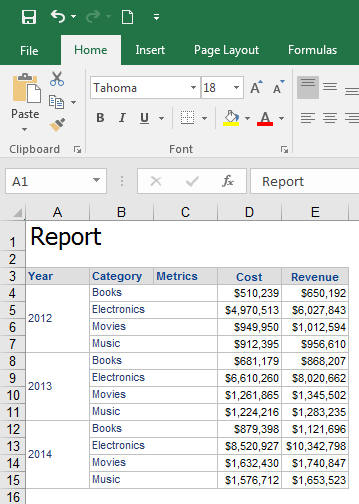
SYMPTOM:
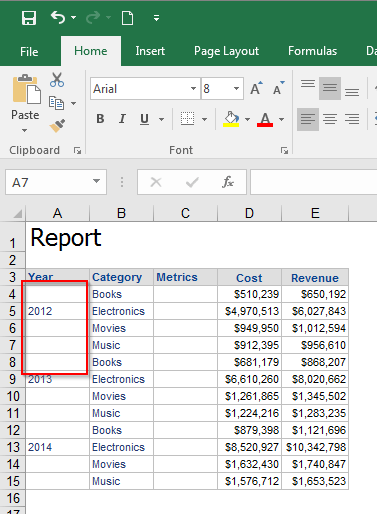
When a report is exported to Excel from Strategy Web 9.4.1 and above, the rows appear unmerged, despite appearing merged. The issue occurs even when the "Merge Row Headers" option is selected in Strategy Web.
STEPS TO REPRODUCE
1. Create a report with Year, Category, Cost and Revenue.
2. Run the report in Web and notice the rows are merged if the "Merge Row Headers" option is selected.
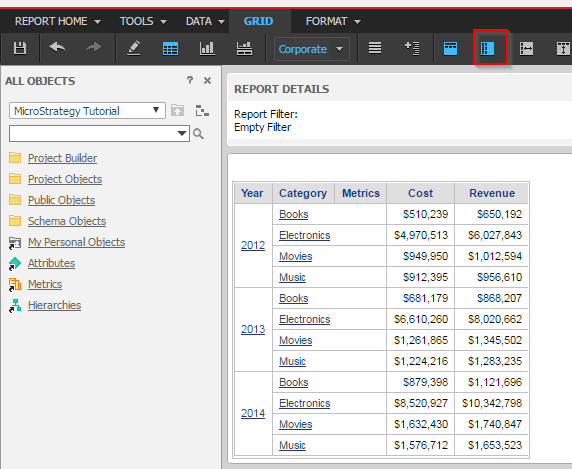
3. Export the report to Excel with formatting.
4. Notice the rows appear unmerged in the exported file.
ACTION:
One possible cause of this issue is that in Strategy Developer, the "Do not merge or duplicate headers when exporting to Excel/Word" option is selected under Project configuration > Project definition > Export Settings.
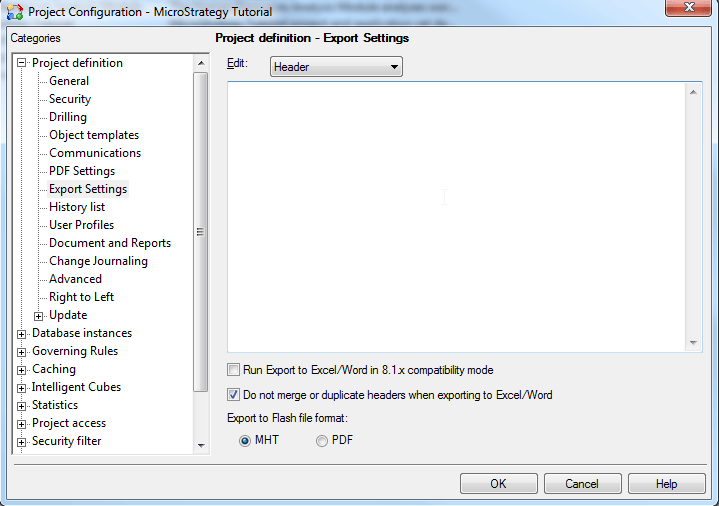
Unselect the setting "Do not merge or duplicate headers when exporting to Excel/Word". Strategy recommends that you only select this check box if instructed to do so by Strategy Technical Support. By default, this check box is cleared. Then the results will be correct as shown below: