SYMPTOM:
Table locks might be enabled to certain warehouse tables when using MySQL database as the warehouse. The locks are not always automatically released, and this might interfere with the Extract, Transform and Load (ETL) process by preventing from updating the locked rows. Table or row locks might also prevent report execution from reading the locked rows. Update or delete locks are more likely to occur unintentionally during report execution than read locks.
CAUSE:
Table locks might be enabled during report execution unintentionally when using MySQL database as a warehouse.
Example statements where update or delete locks are enabled:
INSERT...SELECT
CREATE TABLE...AS SELECT
Example statements where read locks are enabled:
SELECT city FROM lu_customer FOR UPDATE;
SELECT city FROM lu_customer WHERE first_name = 'Jack' LOCK IN SHARE MODE;
Reasons for read locks:
ACTION:
Option 1:
MySQL table locks can be released using UNLOCK or COMMIT statements. The syntax is described as follows:
UNLOCK TABLES;
COMMIT;
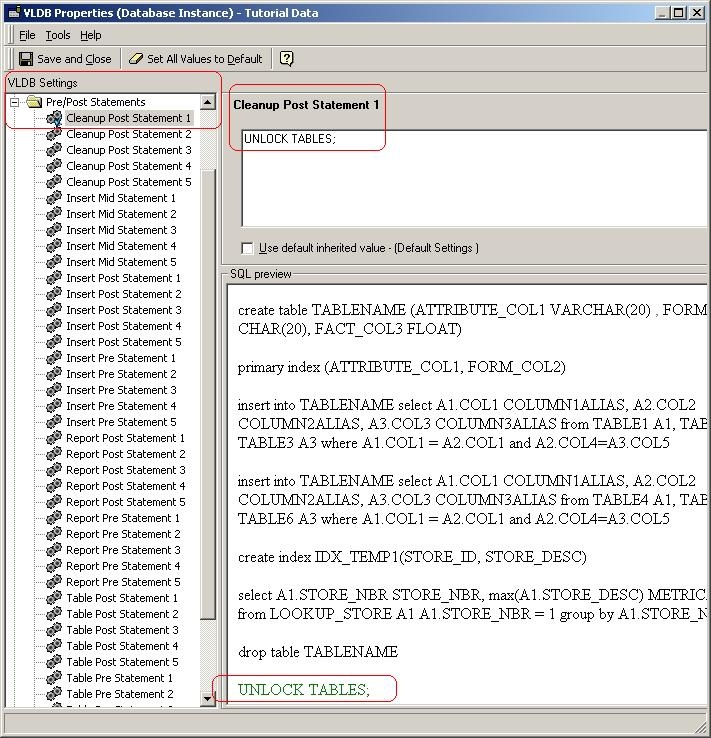
The statement should be added at the end of the report SQL in order to unlock the tables that were locked during the report execution. VLDB pre/post statement property can be used with "Cleanup Post Statement". This enables UNLOCK TABLES or COMMIT to be added as a last statement in the report SQL. "Cleanup Post Statement" can be enabled at Database Instance (DBI) level to have it affect all reports using given DBI or in Report level, this is described as follows.
Option 2:
As described before statements such as INSERT...SELECT can enable update or delete locks. This type of statements are likely to occur when multi-pass SQL is generated by Strategy SQL engine during report execution.
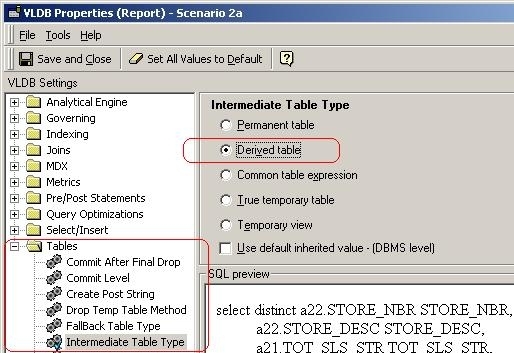
In order to avoid INSERT...SELECT statements Derived Table type should be used as temporary table type. This ensures that no physical temporary tables are used, and the temporary results are resolved in the SQL. Intermediate Table Type can be set with VLDB properties; described as follows:
Option 3:
Third option to prevent table locks with MySQL database is to use AUTOCOMMIT on the database level. This will prevent table locks from occurring unintentionally during report execution since all the transactions are committed after they are executed without additional commit commands. This option should be reviewed with the local database administrator.
The following statement sets AUTOCOMMIT on the database level:
SET autocommit=1;
ADDITIONAL NOTES:
More information about shared locks syntax with MySQL database:
http://dev.mysql.com/doc/refman/5.0/en/innodb-locking-reads.html
More information about LOCK TABLES and UNLOCK TABLES syntax with MySQL database:
http://dev.mysql.com/doc/refman/5.0/en/lock-tables.html
More information about AUTOCOMMIT and COMMIT transaction syntax:
http://dev.mysql.com/doc/refman/5.0/en/commit.html
Third Party Software Installation
WARNING:
The third-party product(s) discussed in this technical note is manufactured by vendors independent of Strategy. Strategy makes no warranty, express, implied or otherwise, regarding this product, including its performance or reliability.
Modifying system environment variable values incorrectly may cause serious, system-wide problems. Any edit of the environment variables is done at the user's own risk. Since these are user-initiated changes, they are not covered by any Strategy warranty.
KB20079
