EducationSoftwareStrategy.com
StrategyCommunity

Knowledge Base

Product

Community

Knowledge Base

TopicsBrowse ArticlesDeveloper Zone

Product

Download SoftwareProduct DocumentationSecurity Hub

Education

Tutorial VideosSolution GalleryEducation courses

Community

GuidelinesGrandmastersEvents
x_social-icon_white.svglinkedin_social-icon_white.svg
Strategy logoCommunity

© Strategy Inc. All Rights Reserved.

LegalTerms of UsePrivacy Policy
  1. Home
  2. Topics

KB20085: How to replace the machines where Narrowcast Server is installed in MicroStrategy Narrowcast Server 9.x - 10.x


Community Admin

• Strategy


In a Narrowcast Server environment, it is possible that the machine running as Distribution Manager/Execution Engine/Logging Server requires to be replaced. In such case, the next steps should be considered in order to point the system to a new machine.

In a Narrowcast Server environment, it is possible that the machine running as Distribution Manager/Execution Engine/Logging Server requires to be replaced. In such case, the next steps should be considered in order to point the system to a new machine. These steps can also be applied to a clustered Narrowcast environment:
 
Note: It is important to create a backup of the Narrowcast Server repositories before conducting the steps
 

  • Stop the Narrowcast system that will be modified.
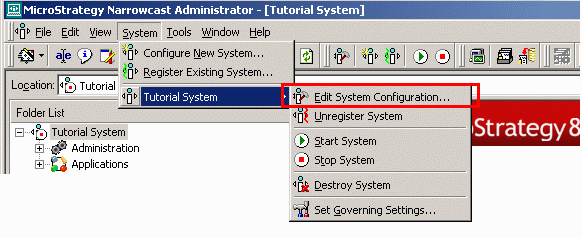
  • Go to the System menu, select the system and click on "Edit system configuration" to open the configuration wizard.
ka04W000000OhRiQAK_0EM440000002BCL.gif
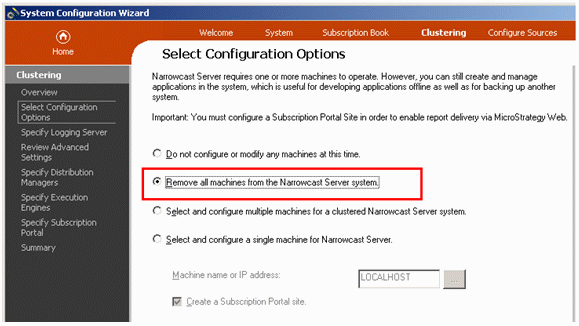
  • Go to the Clustering section of the configuration wizard and select "Remove all machines". Click Next. This step will remove all the references from this system to the old machine.
ka04W000000OhRiQAK_0EM440000002BCR.gif
  • Stop any remaining Narrowcast Services on the server being replaced (Strategy Logging Client, Server, Consumer, etc).
  • In the new machine open the Configuration Wizard and select the new machine that needs to be configured as Server machine.

 
Note. When running the configuration wizard, make sure to go through all the sections (System, Subscription Book and Clustering).
 
After following these steps, the machine reference will be updated in the repositories.


Comment

0 comments

Details

Knowledge Article

Published:

May 19, 2017

Last Updated:

May 19, 2017