SYMPTOM:
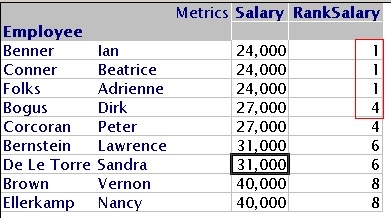
When using the Strategy ranking function, elements with equal values receive the same ranking number. The next element with a different value will skip the numbers that were left out, as shown in the following screenshot:
CAUSE:
This is working as designed, the ranking method used by Strategy is the standard way of ranking. Different ranking schemes are not available as Strategy Functions.
ACTION:
If dense ranking is required, the steps described below should be followed:

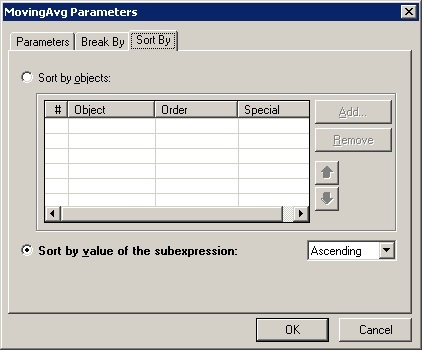
(RunningSum<SortBy= (Salary) >(Case(([M0]= Salary), 0, 1)) + 1)

The metric will now show a dense rank.

The reason for the case statement is that the value for dense rank should only be increased when the current value is different from the previous value. The + 1 is so that our dense rank starts from 1 instead of 0. Sorting by M01 allows us to preserve which of the tied revenue values was returned first by the database (or Analytical Engine if marked as a Smart Metric) to ensure the values are evaluated correctly.
NOTE:
It is possible to create this dense rank with a single metric if there is a unique way of ordering, used in case of tied values. For example, a report ranking at a higher level, can have a single metric M3, defined to rank its values:

The report will show correct value for the two dense ranking metrics:

When drilling down to the lower level, the ranking loses its sort order and the results are incorrect.
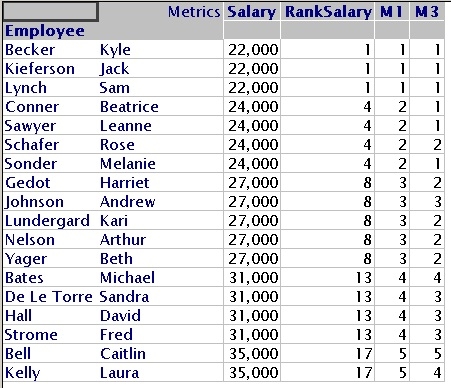
The recommended action is to use the two metric workaround if there will be drilling or other report manipulations performed. The reason for this is that if a single metric is used the RunningSum and the MovingAvg functions will have report specific SortBy parameters that may not work correctly in a drill down report.
