EducationSoftwareStrategy.com
StrategyCommunity

Knowledge Base

Product

Community

Knowledge Base

TopicsBrowse ArticlesDeveloper Zone

Product

Download SoftwareProduct DocumentationSecurity Hub

Education

Tutorial VideosSolution GalleryEducation courses

Community

GuidelinesGrandmastersEvents
x_social-icon_white.svglinkedin_social-icon_white.svg
Strategy logoCommunity

© Strategy Inc. All Rights Reserved.

LegalTerms of UsePrivacy Policy
  1. Home
  2. Topics

KB20098: How to manually Cancel Jobs Submitted via MicroStrategy Intelligence Server


Community Admin

• Strategy


The following are various methods by which a job submitted to Strategy Intelligence Server 9.x may be manually canceled:
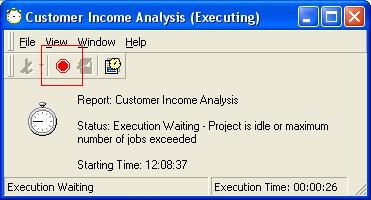
 

  • After submitting a report from Strategy Desktop, clicking the stop sign in the toolbar removes the job from the server job queue.
ka04W000000OeW1QAK_0EM440000002BBH.jpeg
  • Simply closing the report viewer removes the job from the server job queue.
  • Exiting Strategy Desktop cancels all the jobs submitted from this instance of Strategy Desktop. However, if a job is submitted from Strategy Desktop by right-clicking the report and selecting 'Send To History,' it will not be cancelled by exiting Strategy Desktop.
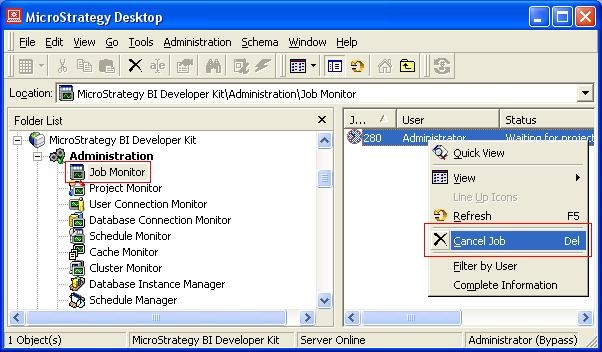
  • If a job is executing or in the queue, it will appear in the Job Monitor, which is located in the Administration menu. Right-clicking the job and selecting 'Cancel Job' will cancel the job.
ka04W000000OeW1QAK_0EM440000002BBX.jpeg
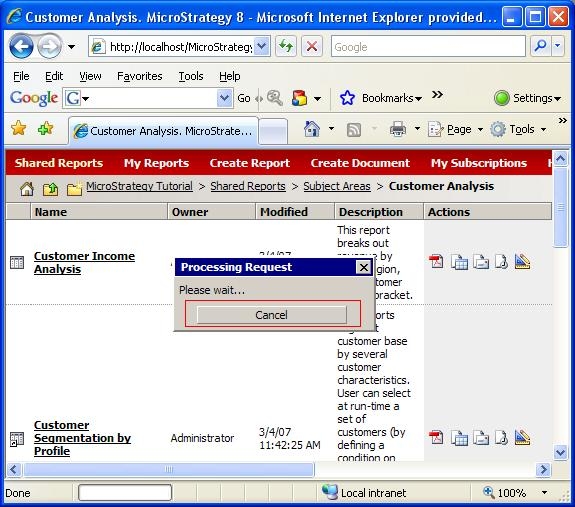
  • When submitting a report in Strategy Web, while the request is processing, clicking the 'Cancel' button will cancel job, as seen below.
ka04W000000OeW1QAK_0EM440000002BBW.jpeg
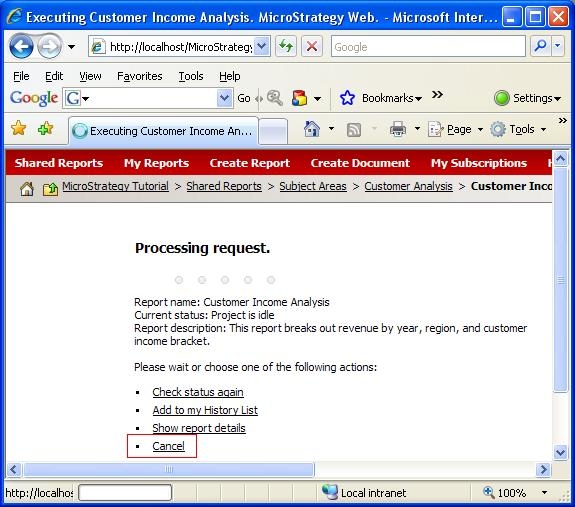
  • If the request has already processed and the job is in the queue, the job may be cancelled from web by selecting 'Cancel' on the webpage, as seen below.

ka04W000000OeW1QAK_0EM440000002BBL.jpeg
  • Logging out of Strategy Web will cancel jobs submitted during that user session.

NOTE:
The above technical note describes various methods by which a job submitted to Strategy Intelligence Server 9.x may be manually cancelled. Automatic cancellation of jobs by the Intelligence Server are triggered under many circumstances some of which include the following:
 

  • The Maximum value for report execution time setting is reached. This setting is located in Project Configuration > Governing.
  • The project goes into Execution Idle mode.
  • Timeout on a SQL statement for purging data in Statistics tables is exceeded.

When a query must be cancelled, a SQLCancel ODBC command is issued by the application (in this case, Strategy Query Engine) to the database. Refer to the following Knowledge Base technical note for more details on how the query cancellation is faciliated in the back-end:
 

  • KB9868 - How is query cancellation facilitated by the Strategy Query Engine?

Comment

0 comments

Details

Knowledge Article

Published:

June 9, 2017

Last Updated:

June 9, 2017