EducationSoftwareStrategy.com
StrategyCommunity

Knowledge Base

Product

Community

Knowledge Base

TopicsBrowse ArticlesDeveloper Zone

Product

Download SoftwareProduct DocumentationSecurity Hub

Education

Tutorial VideosSolution GalleryEducation courses

Community

GuidelinesGrandmastersEvents
x_social-icon_white.svglinkedin_social-icon_white.svg
Strategy logoCommunity

© Strategy Inc. All Rights Reserved.

LegalTerms of UsePrivacy Policy
  1. Home
  2. Topics

KB200990: How to Execute a Report Services Document and Switch to a Different Layout Programmatically Using the MicroStrategy Java Web SDK 10.0


Community Admin

• Strategy


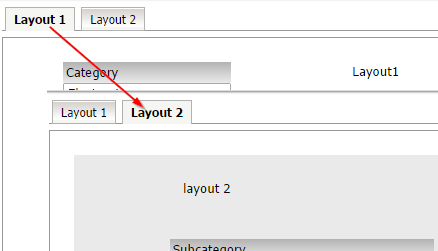
In MicroStrategy Web, users can switch between layouts using the tabs in the document.

In Strategy Web 10.0, users can switch between layouts using the tabs in the document.
ka04W000000OescQAC_0EM440000002Uww.jpeg

It is also possible to programmatically switch the layouts using the Java Web SDK, for example, at run time.
The following code snippet demonstrates how to accomplish this:


package customclasses.misc;
import com.Strategy.web.beans.BeanFactory;
import com.Strategy.web.beans.RWBean;
import com.Strategy.web.beans.WebBeanException;
import com.Strategy.web.objects.WebIServerSession;
import com.Strategy.web.objects.WebObjectsException;
import com.Strategy.web.objects.WebObjectsFactory;
import com.Strategy.web.objects.rw.EnumRWExecutionModes;
import com.Strategy.web.objects.rw.RWInstance;
import com.Strategy.web.objects.rw.RWManipulation;
import com.Strategy.webapi.EnumDSSXMLApplicationType;

public class SwitchMultiLayoutDoc {

	/**
	 * @param args
	 */

	// Create factory object
	static WebObjectsFactory factory = WebObjectsFactory.getInstance();
	static WebIServerSession serverSession = factory.getIServerSession();

	public static void main(String[] args) throws WebBeanException, WebObjectsException {
		// Set session variables
		String SessionID = "";
		
		serverSession.setServerName("servername");
		serverSession.setServerPort(0);
		serverSession.setProjectName("Strategy Tutorial");
		serverSession.setLogin("administrator");
		serverSession.setPassword("");

		serverSession.setApplicationType(EnumDSSXMLApplicationType.DssXmlApplicationCustomApp);

		// Create Session
		try {
			SessionID = serverSession.getSessionID();
			out("Session created: " + SessionID);
		} catch (WebObjectsException ex) {}

		String docID = "370483DB4EF923812F04F385F53584BF";

		// Create new RWBean:
		RWBean rwb = (RWBean) BeanFactory.getInstance().newBean("RWBean");
		rwb.setSessionInfo(serverSession);

		// Set document ID for the RWBean  
		rwb.setObjectID(docID);
		rwb.setExecutionMode(EnumRWExecutionModes.RW_MODE_PDF);
		RWInstance rwi = rwb.getRWInstance();
		rwi.setAsync(false);
		rwi.pollStatus();
		int status = rwi.getStatus();

		//change to desired layout:
		RWManipulation rwmanip = rwi.getRWManipulator(true);
		RWInstance newInst = rwmanip.setCurrentLayout(1, true);

		newInst.setAsync(false);
		newInst.pollStatus();
	}

	public static void out(String s) {
		out.println(s);
	}

}

The example provided in this document is provided “as-is” and user has read the following customization warning:
ADDITIONAL INFORMATION:
The Strategy SDK allows you to customize several Strategy products and extend and integrate the Strategy business intelligence functionality into other applications. However, before changing the way Strategy products look or behave, it is helpful to understand how the application is built. For more information regarding the Strategy products or the process of customizing Strategy products, please refer to Strategy Developer Zone (https://developer.microstrategy.com).
To access the Strategy Developer Zone, you must have access to the Strategy Knowledge Base, you must have purchased the Strategy SDK, and you must be current on your Strategy maintenance agreement. If you are a US-based business and believe that you satisfy all three of these conditions but you do not have access to the Strategy Developer Zone, please contact Strategy Technical Support at support@microstrategy.com or at (703) 848-8700. If you are an international business, please contact Strategy Technical Support at the appropriate email address or phone number found at https://www.microstrategy.com/us/services/support/contact.
CUSTOMIZATION WARNING:
This customization is provided as a convenience to Strategy users and is only directly applicable to the version stated. While this code may apply to other releases directly, Strategy Technical Support makes no guarantees that the code provided will apply to any future or previous builds. In the event of a code change in future builds, Strategy Technical Support makes no guarantee that an updated version of this particular customization will be provided. In the event of a code change in future builds, Strategy may not be able to provide additional code on this matter even though this customization is provided at this time for this specific build. For enhancements to this customization or to incorporate similar functionality into other versions, contact your Account Executive to inquire about Strategy Consulting assistance.


Comment

0 comments

Details

Knowledge Article

Published:

July 21, 2017

Last Updated:

July 21, 2017