EducationSoftwareStrategy.com
StrategyCommunity

Knowledge Base

Product

Community

Knowledge Base

TopicsBrowse ArticlesDeveloper Zone

Product

Download SoftwareProduct DocumentationSecurity Hub

Education

Tutorial VideosSolution GalleryEducation courses

Community

GuidelinesGrandmastersEvents
x_social-icon_white.svglinkedin_social-icon_white.svg
Strategy logoCommunity

© Strategy Inc. All Rights Reserved.

LegalTerms of UsePrivacy Policy
  1. Home
  2. Topics

KB20109: How to Upgrade a Microsoft Visual Basic 6.0 Project to Microsoft Visual Studio .Net 2003 Project.


Community Admin

• Strategy


Using Microsoft Visual Studio .Net 2003, it is possible to quickly convert an older legacy Visual Basic 6.0 application to Visual Basic .Net code. To accomplish this, perform the following steps:
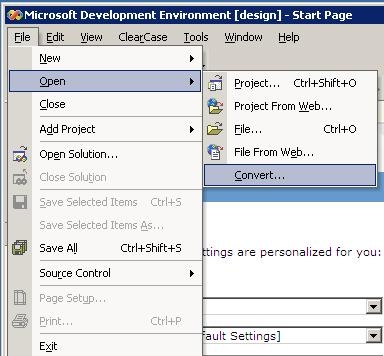
 

  • Launch Microsoft Visual Studio 2003 (these steps assume there is already a valid Visual Basic 6.0 project)
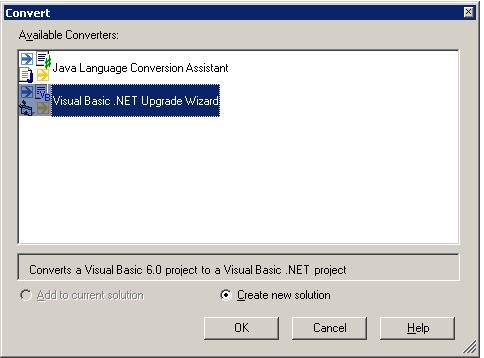
  • Click File > Open > Convert
ka04W000000OgngQAC_0EM440000002GxT.jpeg
  • Select 'Visual Basic .Net Upgrade Wizard' and click OK.
ka04W000000OgngQAC_0EM440000002GxR.jpeg
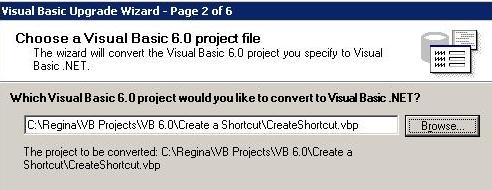
  • Browse to the location of the Visual Basic project and click 'Next'.
ka04W000000OgngQAC_0EM440000002GxX.jpeg
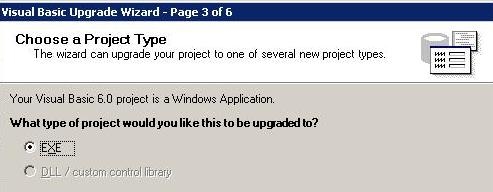
  • Select the option to upgrade to an executable application. Click 'Next'.
ka04W000000OgngQAC_0EM440000002Gxa.jpeg
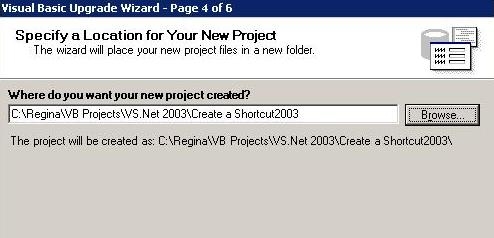
  • Specify the folder location where the new Visual Studio 2003 Solution will be created then click 'Next'.
ka04W000000OgngQAC_0EM440000002GxP.jpeg
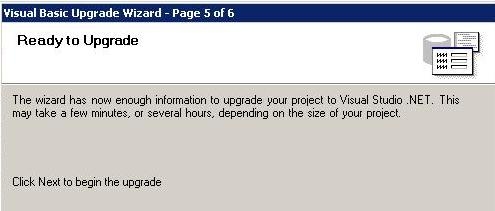
  • Click Next again for the Wizard to Start.
ka04W000000OgngQAC_0EM440000002GxS.jpeg
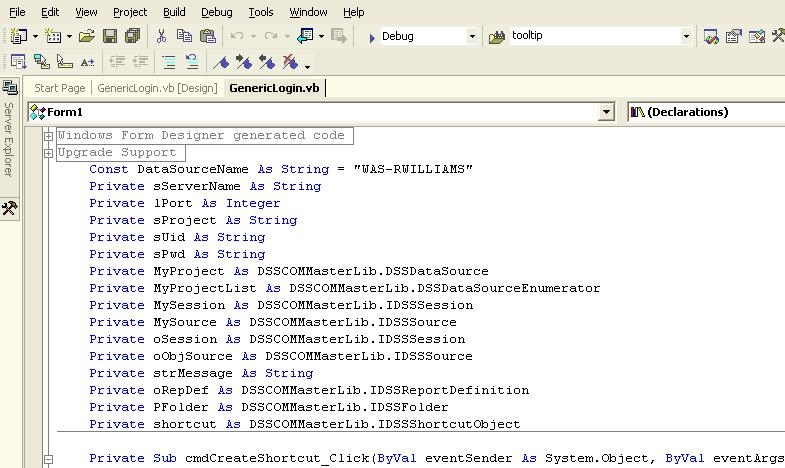
  • Once the Wizards finishes, the code will be modified to VB.Net syntax as shown below:
ka04W000000OgngQAC_0EM440000002GxZ.jpeg

 
Code Customization:
WARNING:
This customization is provided as a convenience to Strategy users and is only directly applicable to the version stated. While this code may apply to other releases directly, Strategy Technical Support makes no guarantees that the code provided will apply to any future or previous builds. In the event of a code change in future builds, Strategy Technical Support makes no guarantee that an updated version of this particular customization will be provided. In the event of a code change in future builds, Strategy may not be able to provide additional code on this matter even though this customization is provided at this time for this specific build. For enhancements to this customization or to incorporate similar functionality into other versions, contact your Account Executive to inquire about Strategy Consulting assistance.
 
Third Party Software Installation:
WARNING:
The third-party product(s) discussed in this technical note is manufactured by vendors independent of Strategy. Strategy makes no warranty, express, implied or otherwise, regarding this product, including its performance or reliability.


Comment

0 comments

Details

Knowledge Article

Published:

June 9, 2017

Last Updated:

June 9, 2017