SUMMARY
This issue has been classified as a defect by Strategy. The impact is limited to Strategy 9.x schedule that only run weekly. A workaround is available and a solution/code fix for this issue is available in Strategy 9.4.1 HF4.
SYMPTOM
Weekly schedules in Strategy 9.3.1 run every day after the 'ALTER SCHEDULE' command manager script is used to modify the schedules.
STEPS TO REPRODUCE
1. In Strategy Desktop 9.3.1 create a weekly schedule and see in the Schedule Wizard that by definition this weekly schedule should run weekly.
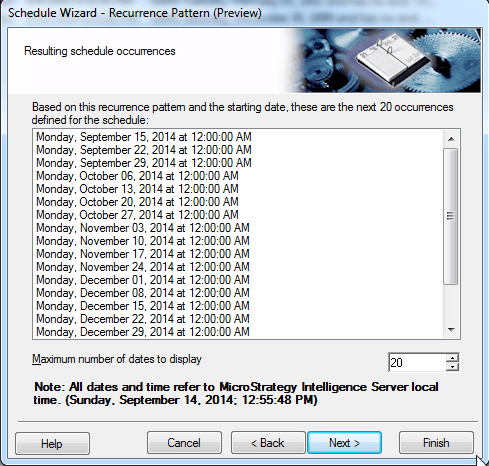
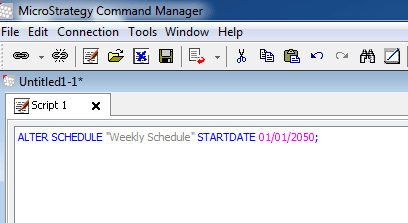
2. Open Command Manager and run the 'ALTER SCHEDULE' command for example:
3. Edit the 'Weekly Schedule' in Desktop and notice the change was reflected and also the weekly schedule occurrence is still valid, at least from the schedule wizard.
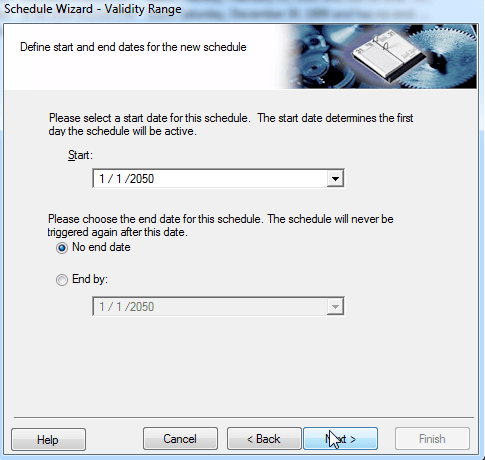

After the weekly schedule is modified via Command Manager, users notice that the schedule executes every day.
CAUSE
This is a defect with Strategy Intelligence Server 9.3.1 - 9.4.1 Hotfix 3.
ACTION
This issue has been fixed in Strategy version 9.4.1 Hotfix 4. Upgrade to this version to take advantage of the fix.
WORKAROUND
Edit each weekly schedule from Strategy Desktop 9.3.x or Strategy Developer 9.4.1 and re-save them again. The old definition of the schedule is overwritten and the correct weekly schedule takes effect. The problem occurs only when Strategy Command Manager 'ALTER SCHEDULE' script is used.
TO LEARN MORE
For similiar/related issues please visit the following Tech Notes:
KB44300 - Time and Event based schedules are not triggered in MicroStrategy 9.3.0 and 9.3.1
KB46290 - "Run subscription immediately" in Desktop does not trigger an email subscription in MicroS...
KB46636 - No time-based scheduled jobs are running while the Delete History List messages (DssCleanu...
