SYMPTOM
A user runs a report against a multidimensional cube and sorts the rows based on an attribute. The rows then appear in an order different from what was expected.
For example, in this Microsoft SQL Server Analysis Services cube based on Strategy Tutorial data, sorting the Region attribute on ID produces the order on the left, whereas the expected order is on the right. The elements "Germany" and "Web" appear out of order.
Strategy Platform (Early Adopter) | Strategy Platform (Early Adopter) |
| |
CAUSE
This issue occurs because the native attribute element IDs from multidimensional data sources are strings describing not only the element's key, but also its hierarchical position. As such, Strategy must sort them as strings.
In the above example, the IDs from the Analysis Services cube are as follows:
[Geography].[Geography].[Region].&[1]
[Geography].[Geography].[Region].&[10]
[Geography].[Geography].[Region].&[12]
[Geography].[Geography].[Region].&[2]
[Geography].[Geography].[Region].&[3]
[Geography].[Geography].[Region].&[4]
[Geography].[Geography].[Region].&[5]
[Geography].[Geography].[Region].&[6]
[Geography].[Geography].[Region].&[7]
[Geography].[Geography].[Region].&[8]
[Geography].[Geography].[Region].&[9]
While the IDs have a numeric portion, the IDs are not numeric. Based on ASCII ordering, the sort is correct, though undesired because the numeric portion is not zero-padded.
ACTION
To sort the elements in numeric order according to key, it is necessary to bring the key values into Strategy as numbers. This is possible in Strategy Engine.
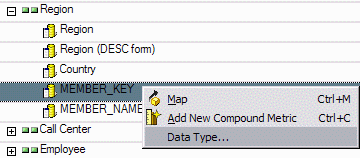
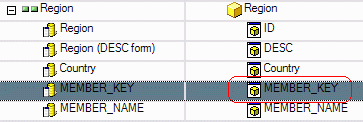
Note: If desired, the Key property can be mapped onto the attribute's ID form. This is typically done when joining multidimensional cube data to relational data in a Report Services Document, but it may also be done here so that the attribute's ID form behaves intuitively. It is also legitimate to map the Key property onto a different attribute form, and then define sorting based on that form. The remainder of this document will map MEMBER_KEY onto the MEMBER_KEY attribute form, and then use this form for sorting.
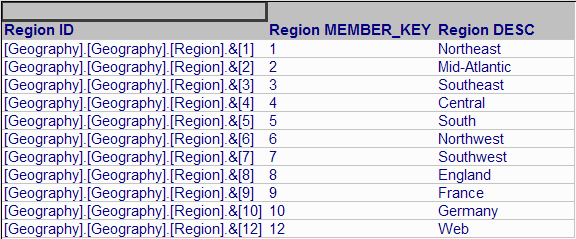
With the sort defined on the numeric MEMBER_KEY attribute form, the attributes appear in the expected order.
Note: When converting data types, a data type conversion error may appear. Consult the following Strategy Knowledgebase document for more information.
KB17480: "Cannot convert type for attribute" error appears when running an MDX Cube report in Strategy
Note: When using SAP cubes in Strategy, another option is to mark the dimension to preserve the order of elements from the data source. For more details, consult the Strategy MDXCube Reporting PDF manual, Chapter 3, "Integrating MDX Cubes into Strategy" > Preserving attribute element orders from MDX cube sources.
