EducationSoftwareStrategy.com
StrategyCommunity

Knowledge Base

Product

Community

Knowledge Base

TopicsBrowse ArticlesDeveloper Zone

Product

Download SoftwareProduct DocumentationSecurity Hub

Education

Tutorial VideosSolution GalleryEducation courses

Community

GuidelinesGrandmastersEvents
x_social-icon_white.svglinkedin_social-icon_white.svg
Strategy logoCommunity

© Strategy Inc. All Rights Reserved.

LegalTerms of UsePrivacy Policy
  1. Home
  2. Topics

KB201280 : Users cannot view Derived Element objects in MicroStrategy Web 9.x


Community Admin

• Strategy


A user has created a standalone Derived Element object. However, the user is unable to navigate to the object in MicroStrategy Web.

SYMPTOM
A user has created a standalone Derived Element object. However, the user is unable to navigate to the object in Strategy Web.
Steps to Reproduce:
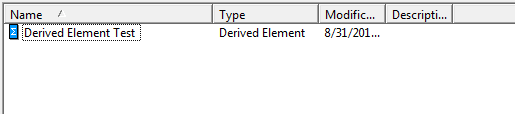
  • In Strategy Desktop, Right click and select New > Derived Element to create a new Derived Element object

ka04W000000Ofx7QAC_0EM4400000025xE.jpeg
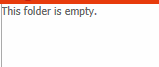
  • If the user navigates to the same folder in Strategy web, the Derived Element object will not display
ka04W000000Ofx7QAC_0EM4400000025xI.jpeg

 
CAUSE
Currently users cannot navigate to Derived Element objects in Strategy Web. This issue has been logged as an enhancement request. Please contact Strategy Technical Support for an update on this enhancement
WORKAROUND
A user may view Derived Elements in Strategy Web by linking it to an attribute. Please follow the steps below:
  1. In Strategy Web, Create a report that contains the attribute used in the Derived Element
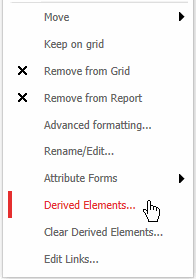
  2. Right click the attribute and select Derived Elements
ka04W000000Ofx7QAC_0EM4400000025xC.jpeg

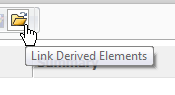
3. In the Derived Elements window, choose the Link button
ka04W000000Ofx7QAC_0EM4400000025x8.jpeg

4. The user can navigate to the Derived Element
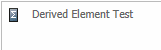
ka04W000000Ofx7QAC_0EM4400000025xG.jpeg


Strategy Internal Reference Number: 813013


Comment

0 comments

Details

Knowledge Article

Published:

May 26, 2017

Last Updated:

July 17, 2017