EducationSoftwareStrategy.com
StrategyCommunity

Knowledge Base

Product

Community

Knowledge Base

TopicsBrowse ArticlesDeveloper Zone

Product

Download SoftwareProduct DocumentationSecurity Hub

Education

Tutorial VideosSolution GalleryEducation courses

Community

GuidelinesGrandmastersEvents
x_social-icon_white.svglinkedin_social-icon_white.svg
Strategy logoCommunity

© Strategy Inc. All Rights Reserved.

LegalTerms of UsePrivacy Policy
  1. Home
  2. Topics

KB201312: Converting Null values to "0" through the Report Data Options menu null display settings have no effect on derived metrics that use Count Distinct functions in MicroStrategy


Community Admin

• Strategy


This article describes an issue with count distinct and the null parameter

SYMPTOM:
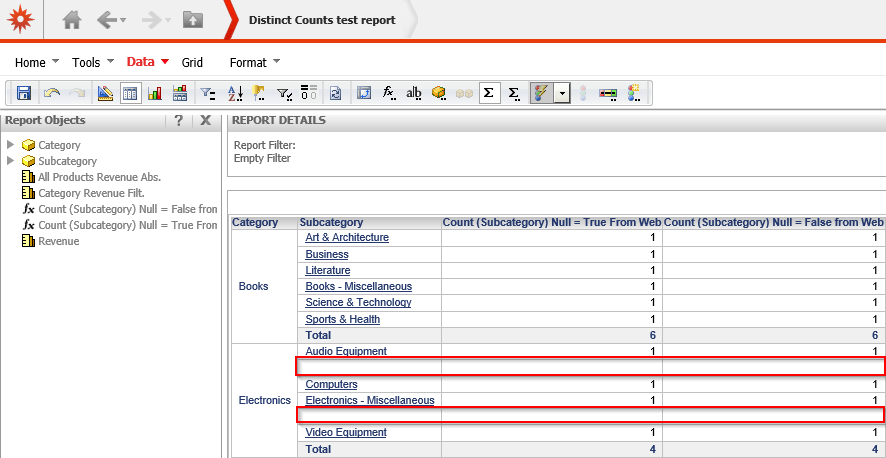
When a user configures in the report data options to display "0" instead of null values on the grid in Strategy, no change occurs. The report will display results as if that setting is not selected as shown below:
 

ka04W000000OcYlQAK_0EM440000002CFg.jpeg

 
STEPS TO REPRODUCE:
 

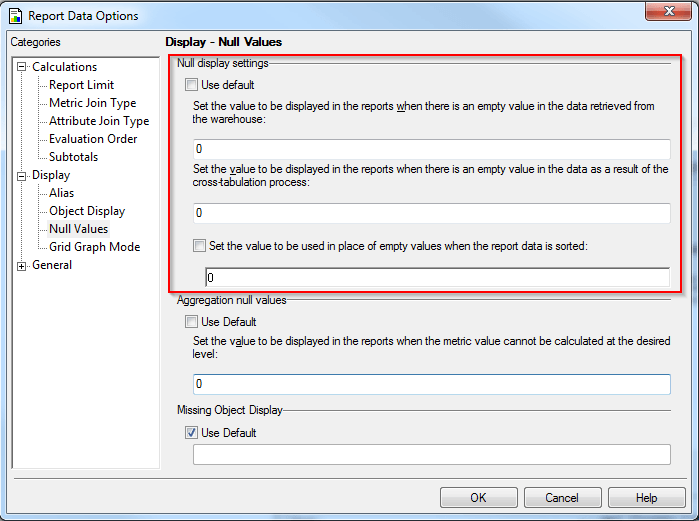
  • In Strategy Developer, configure the null display option in Report Data options setting of the report.
ka04W000000OcYlQAK_0EM440000002CFj.jpeg
  • Create two count distinct derived metrics and places them on the report template. 
ka04W000000OcYlQAK_0EM440000002CFh.jpeg
ka04W000000OcYlQAK_0EM440000002CFn.jpeg
  • The end results still reflect null values and does not display "0" for empty rows as shown above

 
CAUSE:
This is a known issue in Strategy.
 
ACTION:
Currently this issue is being reviewed by Strategy for a potential code fix on an upcoming Strategy release.
 
WORKAROUND:
This issue only applies to derived metrics so using a stand alone metric instead will not have this issue.


Comment

0 comments

Details

Knowledge Article

Published:

May 10, 2017

Last Updated:

May 10, 2017