SUMMARY
This issue has been classified as a defect by Strategy. The impact is limited to Strategy Web dashboards using datasets with derived elements. It is specific to versions 9.4.1 and above of the product. As of now, there are no known workarounds for this issue. A solution/code fix for this issue is not available in current releases but is being reviewed for a future Strategy release.
DESCRIPTION
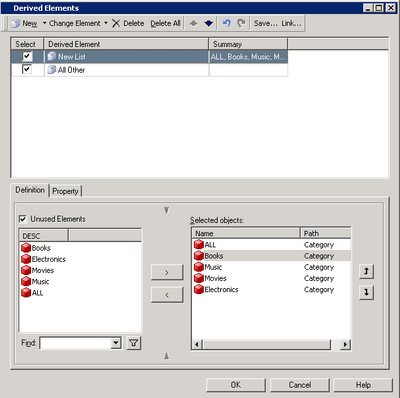
A user has an attribute in an intelligent cube report in Strategy Developer 9.4.1 and wants to use derived elements to display to display the attribute elements in a specific order. They are able to achieve this in the grid report, using the derived element as page-by. However, the display order no longer takes effect when the grid is brought into a dashboard.
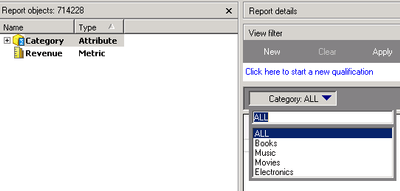
Desktop will display the elements in a manually selected order.
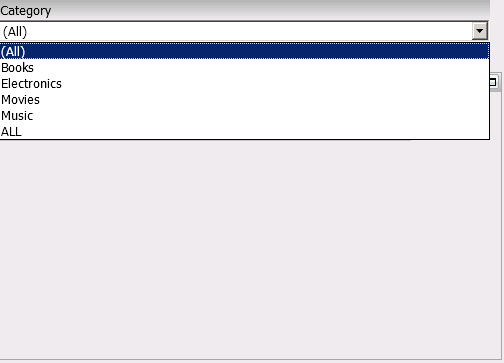
However, the same derived element in Web will display in a different order.
STEPS TO REPRODUCE
CAUSE
This is a defect in Strategy 9.4.1 where a selector or group-by in a dashboard will not take in to account the customized order for the derived elements. The data will display correctly, but not in the user-defined order.
ACTION
Currently this issue is being reviewed by Strategy for a potential code level fix on an upcoming Strategy release. It is strongly encouraged that you post your questions on the community forum for any community based workarounds
ADDITIONAL TROUBLESHOOTING
In some cases, refreshing the intelligent cube or rebuilding the derived element in Desktop will force Web to display the element order correctly. If that doesn't work, to verify that this is the issue you are seeing, call Strategy Support and have the following information available:
RELATED LINKS
KB38760 - Group by derived element the derived metric in document Detail Header section displays “- -” in MicroStrategy 9.x
KB46866 - Derived metric displays null in dynamic text targeted by slice selector with derived element as source in MicroStrategy Analytics Enterprise Web and Developer 9.4.1
KB45942 - Changing the evaluation order of a derived metric in a Report Services Document from "Default" to "1" allows for the calculation to come after any derived elements.
KB31063 - In MicroStrategy Desktop and Web 9.0.0, adding derived elements to a report causes a derived metric to display aggregation nulls “--“
