EducationSoftwareStrategy.com
StrategyCommunity

Knowledge Base

Product

Community

Knowledge Base

TopicsBrowse ArticlesDeveloper Zone

Product

Download SoftwareProduct DocumentationSecurity Hub

Education

Tutorial VideosSolution GalleryEducation courses

Community

GuidelinesGrandmastersEvents
x_social-icon_white.svglinkedin_social-icon_white.svg
Strategy logoCommunity

© Strategy Inc. All Rights Reserved.

LegalTerms of UsePrivacy Policy
  1. Home
  2. Topics

KB201420: Graphs as selectors do not work in Internet Explorer 10 and 11 and MicroStrategy Web 9.4.1.


Community Admin

• Strategy


Users have the ability to create a selector on an attribute in a graph in MicroStrategy Web 9.4.1.  When an attribute element is selected, the target grid will be filtered based on the selection made.  If the user is in Internet Explorer 10 and 11 however, the target grid will not be filtered by the selection made on the graph.

SYMPTOM:
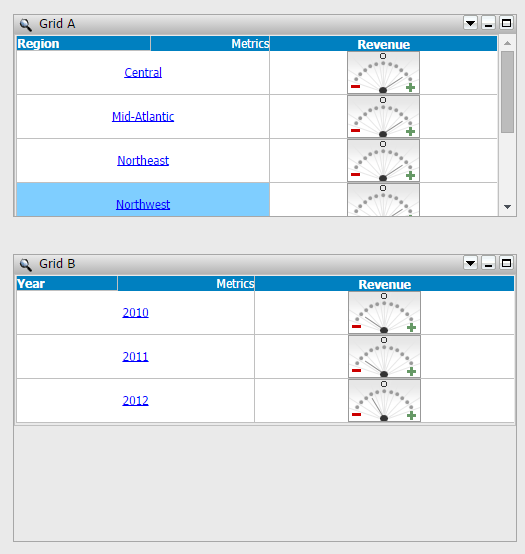
Users have the ability to create a selector on an attribute in a graph in Strategy Web 9.4.1.  When an attribute element is selected, the target grid will be filtered based on the selection made.  If the user is in Internet Explorer 10 and 11 however, the target grid will not be filtered by the selection made on the graph.  Compare the two images below. 
Grid A targets Grid B correctly.
ka04W000000Ohi5QAC_0EM4400000025vH.jpeg

Graph A targets Grid B, but fails to filter it.

ka04W000000Ohi5QAC_0EM4400000025vJ.jpeg

STEPS TO REPRODUCE:

  1. Open Strategy Web 9.4.1 in Internet Explorer 10 or 11.
  2. Create a document with two grids, Grid A and Grid B.
  3. Insert at least one attribute and one metric into Grid A and Grid B.
  4. Right click on the attribute in Grid A and select Use as Selector.
  5. Run the document in Interactive mode and select an attribute element from Grid A.  Notice that Grid B is filtered based on the selection from Grid A.
  6. Return to Design mode and change the view mode of Grid A to a graph.
  7. Run the document in Interactive mode and select an attribute element on the graph.  Notice that Grid B is not filtered based on this selection.

CAUSE:
This is a known issue in Strategy Web 9.4.1 with Internet Explorer 10 and 11.
ACTION:
This issue has been addressed in Strategy 9.5.1 and above. Please upgrade to take advantage of the fix.
WORKAROUND:
If possible, use any other supported browser.
The Strategy Internal Reference Number for the issue discussed in this technical note is 912950.


Comment

0 comments

Details

Knowledge Article

Published:

April 21, 2017

Last Updated:

April 21, 2017