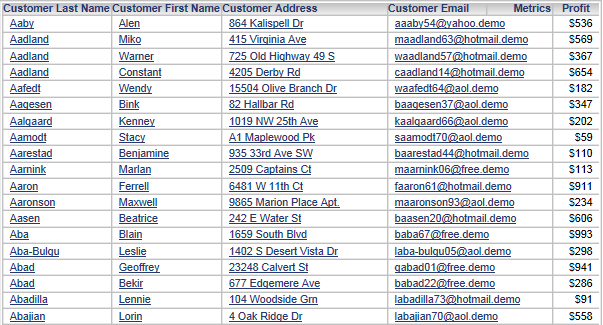
SYMPTOM:
In Strategy Web 9.4.1 and above, an attribute with three or more attribute forms will display the last attribute form under the Metrics name header on a report, like shown below.
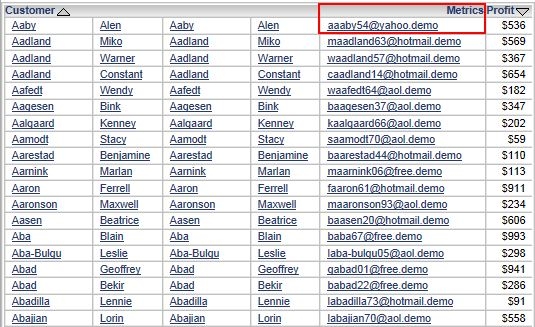
Note: This issue does not occur in Strategy Developer.
STEPS TO REPRODUCE:
In Strategy Tutorial:
CAUSE:
This is working as designed in Strategy Web. When the right most attribute in the rows has multiple attribute forms, the last attribute form will fall under the Metric column header.
WORKAROUND:
Remove the Metrics name header. To do this, check the setting "Remove extra column" in the Report Options, like shown below.
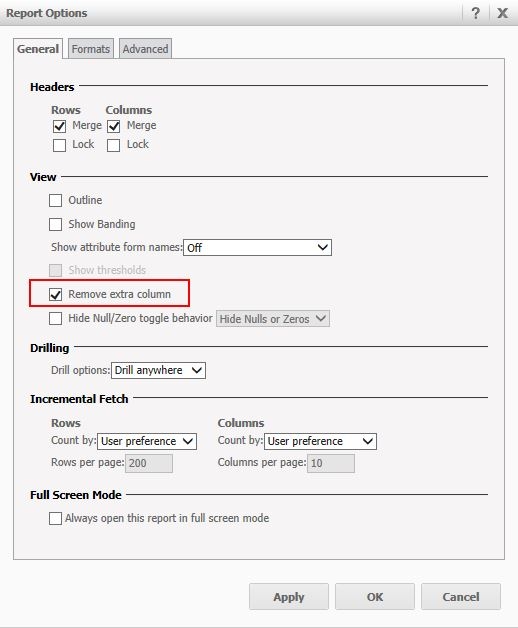
Or enable the Attribute Form names from the Report Options menu. Enabling the display of the attribute form names will look clearer, as shown below: