EducationSoftwareStrategy.com
StrategyCommunity

Knowledge Base

Product

Community

Knowledge Base

TopicsBrowse ArticlesDeveloper Zone

Product

Download SoftwareProduct DocumentationSecurity Hub

Education

Tutorial VideosSolution GalleryEducation courses

Community

GuidelinesGrandmastersEvents
x_social-icon_white.svglinkedin_social-icon_white.svg
Strategy logoCommunity

© Strategy Inc. All Rights Reserved.

LegalTerms of UsePrivacy Policy
  1. Home
  2. Topics

KB201836: Error "item 'XXX' cannot be found. Searching for 'XXX' resulted in no matches" when add filter during data import from database in MicroStrategy Web 9.x


Community Admin

• Strategy


In MicroStrategy Web 9.x, following error occurs when add filter condition during import data from database even though the search item XXX exist in data warehouse.

Symptoms

In Strategy Web 9.x, following error occurs when add filter condition during import data from database even though the search item XXX exist in data warehouse.


"item 'XXX' cannot be found. Searching for 'XXX' resulted in no matches"
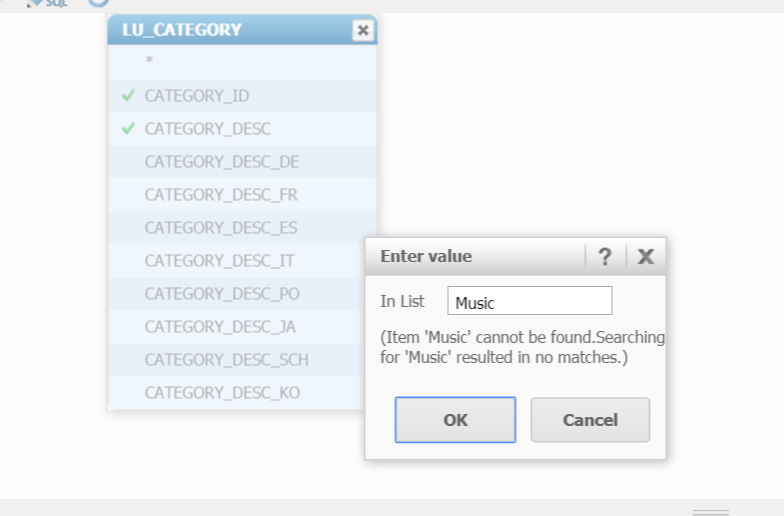
 
A sample error screen:

ka04W000000OgcVQAS_0EM4400000025zT.jpeg

Diagnosis

When set filter condition to a text type attribute form, it is necessary to double quote the input text to form the correct SQL.

Solution

Add double quote to the text, as shown below:

ka04W000000OgcVQAS_0EM4400000025zR.jpeg

Comment

0 comments

Details

Knowledge Article

Published:

June 13, 2017

Last Updated:

June 13, 2017