EducationSoftwareStrategy.com
StrategyCommunity

Knowledge Base

Product

Community

Knowledge Base

TopicsBrowse ArticlesDeveloper Zone

Product

Download SoftwareProduct DocumentationSecurity Hub

Education

Tutorial VideosSolution GalleryEducation courses

Community

GuidelinesGrandmastersEvents
x_social-icon_white.svglinkedin_social-icon_white.svg
Strategy logoCommunity

© Strategy Inc. All Rights Reserved.

LegalTerms of UsePrivacy Policy
  1. Home
  2. Topics

KB201906: How to display superscript for attribute form in grid in report services document in MicroStrategy Web 9.4.1 and above.


Community Admin

• Strategy


How to display superscript for attribute form in grid in report services document in MicroStrategy Web 9.4.1 and above.

Please follow below steps to display superscript for attribute form in grid in report services document in Strategy Web:
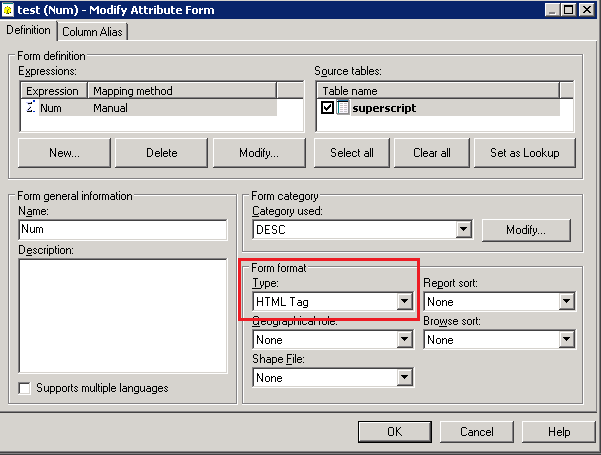
  1. Create a new attribute form as HTML tag type:


ka04W000000ObdNQAS_0EM4400000025z3.jpeg
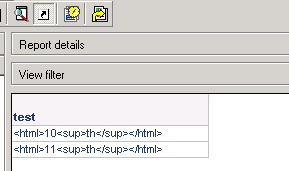
  1. Convey the data to HTML string where "th" is in <sup></sup> tag(<sup> is used for display the string as superscript). E,g., "10th" becomes "<html>10<sup>th</sup></html>". So the report is displayed as below:


ka04W000000ObdNQAS_0EM4400000025z8.jpeg
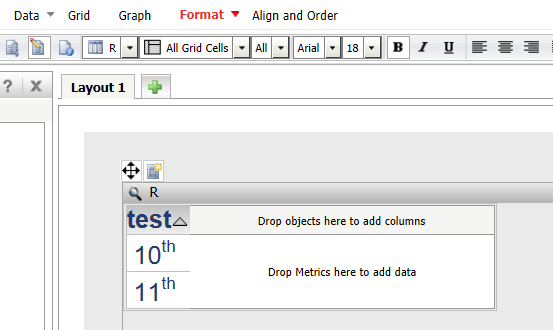
  1. Create document on above report. The grid is displayed as below:


ka04W000000ObdNQAS_0EM4400000025z6.jpeg


Note: To convey the data to HTML string, the syntax may vary on database type. And the pass-through functions are required depending on how the data is stored.


Comment

0 comments

Details

Knowledge Article

Published:

May 19, 2017

Last Updated:

May 19, 2017