Customer segmentation analysis is a way to get a snapshot of various properties of customers by performing a data-mining analysis to group customers into buckets with common features. By repeating the analysis periodically, it is possible to identify customers who have migrated from one bucket to another between analysis periods.
The desired report will show the starting, or "from," segments on the left and the ending, "to," segments across the top. Each cell is a count of the customers belonging to the starting segment in the earlier analysis run who also belong to the ending segment in the later run. This report shows that nine customers stayed in segment 1 in both analysis periods, while four customers migrated from segment 1 to segment 2 in the same period. (For this illustration, segments were assigned randomly to 200 of the customers in the Strategy Tutorial warehouse.)

This document proposes a data modeling and report design strategy to implement this analysis.
Physical schema
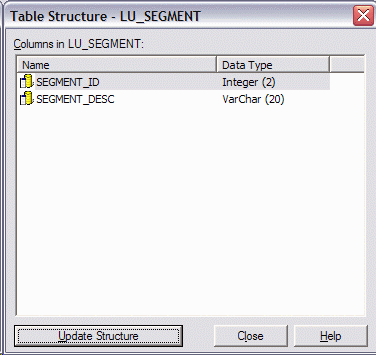
It is assumed here that a lookup table for customers already exists in the data warehouse, as in the Strategy Tutorial project used in this illustration. In addition, two more tables should be added.

Logical schema
It is assumed that a Customer attribute already exists in the project. In addition, four other attributes are required:
These are role attributes, and the FROM and TO attributes must be mapped to separate logical tables. The recommended way to handle role attributes in Strategy is to create explicit table aliases within the project, as noted in the following Strategy Knowledgebase document.
KB6197 (KB5800-072-0108): How do Attribute Roles Work in Strategy 8.x?
Accordingly, after LU_SEGMENT and REL_CUST_SEGMENT have been imported into the warehouse catalog, the logical tables (found in the Schema Objects\Tables folder) are aliased and renamed as follows:
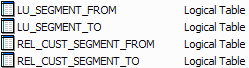
LU_SEGMENT_FROM and LU_SEGMENT_TO use the same physical LU_SEGMENT table; likewise for the REL_CUST_SEGMENT pair.
The attributes are created with parallel definitions. It is very important that the FROM attributes be mapped only to the _FROM tables, and the TO attributes only to the _TO tables.

These attributes should not have parent-child relationships. The REL_CUST_SEGMENT tables will function as fact tables, and the attributes relate indirectly through the facts.
To control table assignments, a pair of Customer ID facts are also needed. These facts should be mapped only to their respective REL_CUST_SEGMENT tables, and not to any other tables.

Application objects
The application objects required for this report reflect the calculation algorithm.
Report-as-filter to build customer-segment associations
Metrics will be used to associate customers with their FROM and TO segments. This requires metric conditionality and careful attention to dimensionality. In this example, the Run filters are hardcoded, but they could easily be prompted so that the end-user could choose the analysis runs to compare.
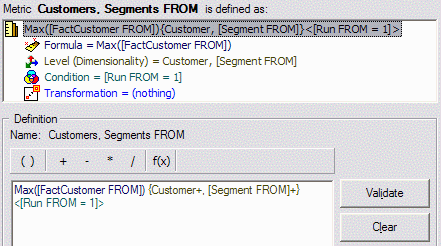
Finally, the report-as-filter includes the attributes Customer, Segment FROM and Segment TO, and both metrics on the template.
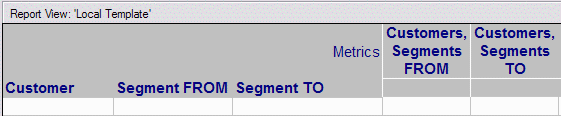
Final report
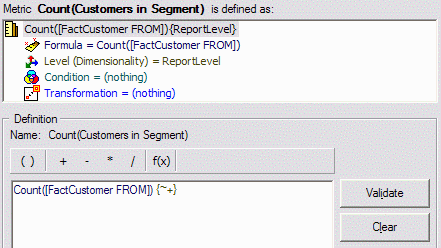
The final report places Segment FROM on the rows, Segment TO on the columns, and a customer count metric. This metric is a count distinct of FactCustomer FROM (though it could just as easily use Fact Customer TO).
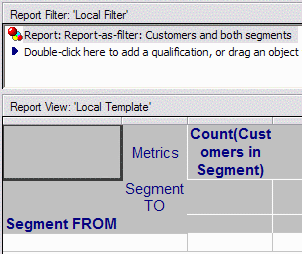
The filtering report is used as part of the report filter.
The report SQL shows how the result is obtained methodically.
select a11.SEGMENT_ID SEGMENT_ID,
a11.CUSTOMER_ID CUSTOMER_ID,
max(a11.CUSTOMER_ID) WJXBFS1
into #ZZMD00
from REL_CUST_SEGMENT a11
where a11.RUN_ID in (1)
group by a11.SEGMENT_ID,
a11.CUSTOMER_ID
select a11.SEGMENT_ID SEGMENT_ID,
a11.CUSTOMER_ID CUSTOMER_ID,
max(a11.CUSTOMER_ID) WJXBFS1
into #ZZMD01
from REL_CUST_SEGMENT a11
where a11.RUN_ID in (2)
group by a11.SEGMENT_ID,
a11.CUSTOMER_ID
select pa11.CUSTOMER_ID CUSTOMER_ID,
pa11.SEGMENT_ID SEGMENT_ID,
pa12.SEGMENT_ID SEGMENT_ID0,
pa11.WJXBFS1 WJXBFS1,
pa12.WJXBFS1 WJXBFS2
into #ZZMQ02
from #ZZMD00 pa11
join #ZZMD01 pa12
on (pa11.CUSTOMER_ID = pa12.CUSTOMER_ID)
select a11.SEGMENT_ID SEGMENT_ID,
max(a14.SEGMENT_DESC) SEGMENT_DESC,
pa13.SEGMENT_ID0 SEGMENT_ID0,
max(a12.SEGMENT_DESC) SEGMENT_DESC0,
count(distinct a11.CUSTOMER_ID) WJXBFS1
from REL_CUST_SEGMENT a11
cross join LU_SEGMENT a12
join #ZZMQ02 pa13
on (a11.CUSTOMER_ID = pa13.CUSTOMER_ID and
a11.SEGMENT_ID = pa13.SEGMENT_ID and
a12.SEGMENT_ID = pa13.SEGMENT_ID0)
join LU_SEGMENT a14
on (a11.SEGMENT_ID = a14.SEGMENT_ID)
group by a11.SEGMENT_ID,
pa13.SEGMENT_ID0
Note: Even though there is a cross join in the final pass, there is no multiple counting because the join a12.SEGMENT_ID = pa13.SEGMENT_ID0 ensures that only one segment row from a12 will be preserved per customer. The cross join is merely a consequence of the order in which the tables are introduced into the from clause. The above from clause is functionally equivalent to the following; therefore, the cross join is of no concern.
from REL_CUST_SEGMENT a11
join #ZZMQ02 pa13
on (a11.CUSTOMER_ID = pa13.CUSTOMER_ID and
a11.SEGMENT_ID = pa13.SEGMENT_ID)
join LU_SEGMENT a12
on (a12.SEGMENT_ID = pa13.SEGMENT_ID0)
join LU_SEGMENT a14
on (a11.SEGMENT_ID = a14.SEGMENT_ID)
