EducationSoftwareStrategy.com
StrategyCommunity

Knowledge Base

Product

Community

Knowledge Base

TopicsBrowse ArticlesDeveloper Zone

Product

Download SoftwareProduct DocumentationSecurity Hub

Education

Tutorial VideosSolution GalleryEducation courses

Community

GuidelinesGrandmastersEvents
x_social-icon_white.svglinkedin_social-icon_white.svg
Strategy logoCommunity

© Strategy Inc. All Rights Reserved.

LegalTerms of UsePrivacy Policy
  1. Home
  2. Topics

KB202586: Chinese characters of axis lable and legend in a graph are missing on MicroStrategy Analytics Web 9.x and 10.x


Community Admin

• Strategy


Chinese characters of axis lable and legend in a graph are missing on MicroStrategy Analytics Web 9.x and 10.x

SYMPTOM:
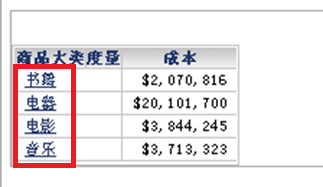
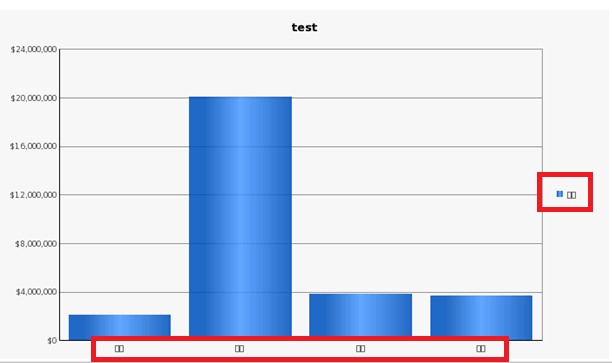
When Intelligence Server is installed on Unix/Linux platforms, Chinese characters in axis label and legend are missing on Strategy Analytics Web 9.x and 10.x, although the grid works fine, as shown below.
 
The grid works fine
ka04W000000ObkmQAC_0EM440000002R1i.png

 
Chinese characters are missing in graph
ka04W000000ObkmQAC_0EM440000002R1n.png

 
CAUSE:
By default, there are no Chinese fonts in $MSTR_INSTALL_PATH/PDFGeneratorFiles folder on Unix/Linux platforms, while displaying Chinese charaters requires Chinese fonts in PDFGeneratorFiles folder.
 
ACTION:
Refer to the technical note below to install Chinese fonts required on Unix/Linux platforms.
KB41194 - How to install and use fonts with MicroStrategy Intelligence Server Universal 9.x on Unix/Linux
000007903


Comment

0 comments

Details

Knowledge Article

Published:

June 8, 2017

Last Updated:

November 8, 2018