EducationSoftwareStrategy.com
StrategyCommunity

Knowledge Base

Product

Community

Knowledge Base

TopicsBrowse ArticlesDeveloper Zone

Product

Download SoftwareProduct DocumentationSecurity Hub

Education

Tutorial VideosSolution GalleryEducation courses

Community

GuidelinesGrandmastersEvents
x_social-icon_white.svglinkedin_social-icon_white.svg
Strategy logoCommunity

© Strategy Inc. All Rights Reserved.

LegalTerms of UsePrivacy Policy
  1. Home
  2. Topics

KB20306: How to create dynamic date based on 'Last Month' in MicroStrategy SQL Generation Engine 9.4.x-10.x using an Oracle database


Stefan Zepeda

Salesforce Solutions Architect • Strategy


The Dynamic Dates in MicroStrategy SQL Generation Engine 9.4.x-10.x use the Day attribute to qualify on a particular date. Thus, if a Dynamic Date is created based on today's date, in order to get 'Last Month' a specific number of days can be subtracted from the date. But since the length of the month ranges between 28-31 days it is almost impossible to get the correct output based on the Day attribute.

The Dynamic Dates in Strategy SQL Generation Engine 9.4.x-10.x use the Day attribute to qualify on a particular date. Thus, if a Dynamic Date is created based on today's date, in order to get 'Last Month' a specific number of days can be subtracted from the date. But since the length of the month ranges between 28-31 days it is almost impossible to get the correct output based on the Day attribute.
 
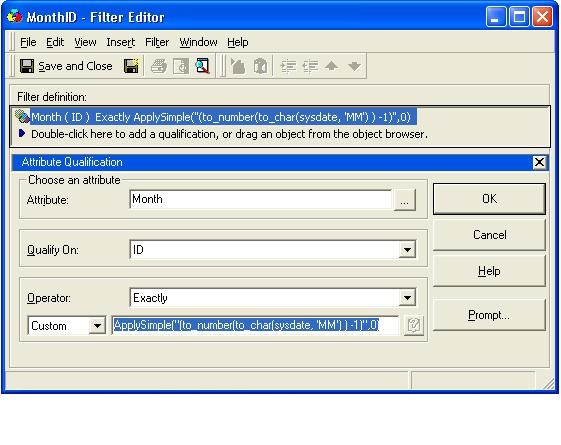
If users want to have the output based on a different Attribute other that Date (e.g., month), they must follow the steps below:
 

  1. Create a new filter based on Attribute Qualification
  2. Select the desired attribute (in this case, the Month attribute).
  3. Select Qualify On as ID
  4. Select Operator as Exactly
  5. Select Custom and use the following expression:
    ApplySimple ("(to_number (to_char (sysdate, 'MM')) -1)", 0)

Please find below the screenshot of the filter editor:
ka02R000000kcTWQAY_0EM440000002Ed6.jpeg

 
Also, find below the SQL for this report:
 
Select a11.MONTH_ID MONTH_ID,
a11.MONTH_DESC MONTH_DESC
From LU_MONTH a11
Where a11.MONTH_ID = (to_number (to_char (sysdate, 'MM')) -1)
NOTE:
This expression was designed for Oracle but similar SQL can be generated for other databases.


Comment

0 comments

Details

Knowledge Article

Published:

April 18, 2017

Last Updated:

April 18, 2017