EducationSoftwareStrategy.com
StrategyCommunity

Knowledge Base

Product

Community

Knowledge Base

TopicsBrowse ArticlesDeveloper Zone

Product

Download SoftwareProduct DocumentationSecurity Hub

Education

Tutorial VideosSolution GalleryEducation courses

Community

GuidelinesGrandmastersEvents
x_social-icon_white.svglinkedin_social-icon_white.svg
Strategy logoCommunity

© Strategy Inc. All Rights Reserved.

LegalTerms of UsePrivacy Policy
  1. Home
  2. Topics

KB203226: Documents hang when switching from design view to interactive view and the status of the job is “Waiting for children” in the job monitor in MicroStrategy 9.3.x - 9.4.x


Community Admin

• Strategy


Documents hang when switching from design view to interactive view and the status of the job is “Waiting for children” in the job monitor in MicroStrategy 9.3.x - 9.4.x

SYMPTOM
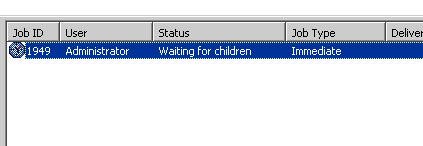
In a clustered Intelligence Server environment, users may notice that in certain situations, a document hangs when executed from design mode. The status of the job in the job monitor (in Strategy Desktop/Developer) appears as “waiting for children” for an indefinite period of time. 
ka04W000000OfwjQAC_0EM4400000029Jk.jpeg

 
STEPS TO REPRODUCE

  1. Configure a 2-node Intelligence Server cluster with local or centralized caching. The cluster can be configured to use the Strategy Tutorial metadata.
  2. Connect to node1 from Desktop/Developer and create a value date prompt.
  3. Create a filter and add the date prompt from step 2 to the filter. The filter should be defined as "Day (ID) Exactly [Value (Date)]".
  4. Create a report with the "Day" attribute. Add the filter from step 3 to the report filter. Save and close the report.
  5. Execute the report and choose any day as the prompt answer. 
  6. Do not save and close the report after execution. Confirm that a cache was successfully created on node1.
  7. Go to Strategy Web and create a user session on Node2 of the cluster (the node where the report was NOT created).
  8. Right-click the report created in step 4 and select the option to create a new document from the report.
  9. On the next screen, select the option to edit the document in design mode.
  10. From design mode, attempt to execute the document in interactive mode. The document will now be stuck on the processing request page indefinitely. 

 
CAUSE
This is an identified defect in Strategy 9.3.x - 9.4.x.
 
ACTION
Contact Strategy Technical Support for an update on the status of the issue. Currently, this issue is still being reviewed for feasibility by our Technology team and it is scoped for an upcoming scheduled Strategy release.
 
The Strategy internal reference number for this issue is 964889.


Comment

0 comments

Details

Knowledge Article

Published:

June 8, 2017

Last Updated:

July 17, 2017