SYMPTOM:
When customizing the borders line in the report grid, the vertical border line that separates attributes and metrics does not appear.
STEPS TO REPRODUCE
1. Create a report with the Year, Category, and Subcategory attributes and Cost and Revenue metrics
2. Run the report in Strategy Web and enable the following options
- Remove extra column
- Lock Row Headers
- Lock Column Headers
- Auto Fit to Contents
3. Go to [Format] > [Adcanced Formatting] > [Color and Lines], then make changes as below to customize the border lines
- Change the drop down to [All Grid Cells] and [All]
- As for the borders, choose "None" and click apply button
- Then, in the Borders section, choose "thin" for [Right] and [Bottom]
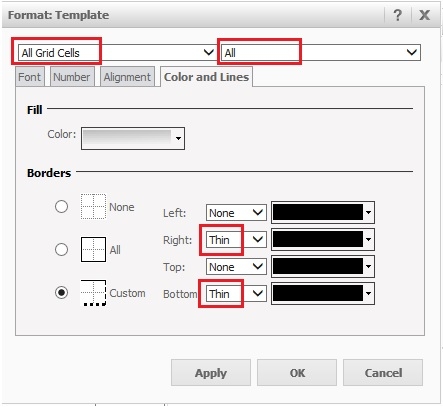
4. The expected grid display is as follows:

5. In Internet Explorer 8, however, the border that separates attributes and metrics in the grid does not appear.

CAUSE:
This is a known issue in Strategy Web 9.4.1
ACTION:
Strategy will continue to investigate and post updates as soon as they are available.
