EducationSoftwareStrategy.com
StrategyCommunity

Knowledge Base

Product

Community

Knowledge Base

TopicsBrowse ArticlesDeveloper Zone

Product

Download SoftwareProduct DocumentationSecurity Hub

Education

Tutorial VideosSolution GalleryEducation courses

Community

GuidelinesGrandmastersEvents
x_social-icon_white.svglinkedin_social-icon_white.svg
Strategy logoCommunity

© Strategy Inc. All Rights Reserved.

LegalTerms of UsePrivacy Policy
  1. Home
  2. Topics

KB20335: Report shows incorrect repeated values across an attribute elements in MicroStrategy Developer 9.4.x and 10.x


Stefan Zepeda

Salesforce Solutions Architect • Strategy


Report shows incorrect repeated values across an attribute elements in MicroStrategy Developer 9.4.x and 10.x

SYMPTOM:
A report returns repeated values across the same attribute element even when the data in the warehouse is different.
 

ka02R000000kcK5QAI_0EM440000002EcZ.jpeg

 
The report shown above generates incorrect values for Metric 2. The SQL generated is the following:
 
select a11.Category_ID Category_ID,
a12.Category_Name Category_Name,
a11.Fact1 WJXBFS1,
a11.Fact2 WJXBFS2
from FactTable a11
join Category a12
on (a11.Category_ID = a12.Category_ID)
When executed using ODBC test tool or a native tool the results come back correctly. The values across the Category for Metric 2 are not repeated in the database
 

ka02R000000kcK5QAI_0EM440000002Ecb.jpeg

 
CAUSE:
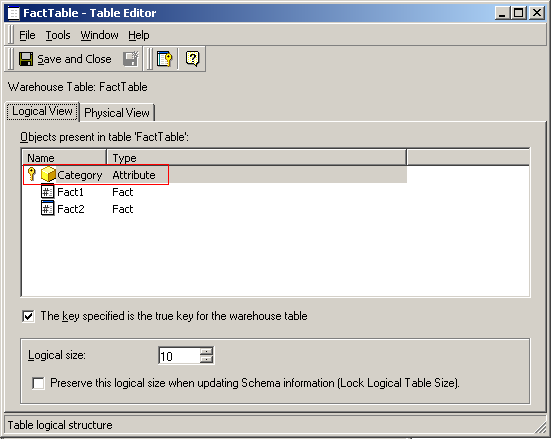
This is working as designed. The Strategy object definitions are not consistent with the structure in the database tables. The report is hitting the lowest level of aggregation detected by Strategy on the fact table. This can be checked by looking at the fact table used to calculate the metrics. The table will list the attribute used in the report as a unique key in its definition:
 

ka02R000000kcK5QAI_0EM440000002EcY.jpeg

 
The effect is that Strategy assumes that one single row will be present per Category as it is the only attribute marked as the unique key.
 
ACTION:

  • Specify in the table that the attribute is not the true warehouse key.
ka02R000000kcK5QAI_0EM440000002EcQ.jpeg
  •  
    By telling Strategy that the key is not the true warehouse key it will know that the attribute ID might not be unique per row in the fact table. As the ID might not be unique to a row aggregation is performed.
     
  • Add another attribute that is also a primary key of the fact table.
ka02R000000kcK5QAI_0EM440000002Ecd.jpeg
  •  
    Strategy will detect that as the Category is not the only primary key. As there can be multiple rows with the same attribute ID, the report will perform aggregation
     

Both actions described above will generate a report that performs aggregation as shown below:
 

ka02R000000kcK5QAI_0EM440000002Eca.jpeg


Comment

0 comments

Details

Knowledge Article

Published:

May 11, 2017

Last Updated:

May 11, 2017