EducationSoftwareStrategy.com
StrategyCommunity

Knowledge Base

Product

Community

Knowledge Base

TopicsBrowse ArticlesDeveloper Zone

Product

Download SoftwareProduct DocumentationSecurity Hub

Education

Tutorial VideosSolution GalleryEducation courses

Community

GuidelinesGrandmastersEvents
x_social-icon_white.svglinkedin_social-icon_white.svg
Strategy logoCommunity

© Strategy Inc. All Rights Reserved.

LegalTerms of UsePrivacy Policy
  1. Home
  2. Topics

KB203478: How to use sub-string as search filter in MicroStrategy Developer 9.x?


Stefan Zepeda

Salesforce Solutions Architect • Strategy


How to use sub-string as search filter in MicroStrategy Developer 9.x

Question

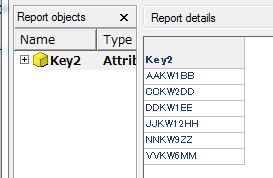
The following report shows the attribute elements filtered by the substring keywords stored in other database table.
ka02R000000kX0OQAU_0EM440000002CFp.jpeg


 Table_1: The column contains the keywords which are part of the element of the attribute.

 Table_2: Lookup table of the attribute.
  

 Table_2: Lookup table of the attribute.
  

 Table_2: Lookup table of the attribute.
  

Answer

The following example shows the steps to create the report above:
  • Create an attribute mapped to key2 column on Table_2.
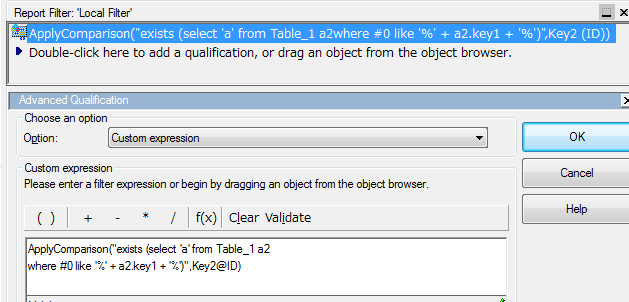
  • Apply the custom expression filter as shown in the image below:
ka02R000000kX0OQAU_0EM440000002CFw.jpeg
  • 
    ApplyComparison("exists (select 'a' from Table_1 a2 where #0 like '%' + a2.key1 + '%')",Key2@ID)


Comment

0 comments

Details

Knowledge Article

Published:

April 12, 2017

Last Updated:

April 12, 2017