SYMPTOM:
Users of a particular group are unable to make use of report cache when running reports in Strategy Web. Administrator users and certain groups of power users do see that cache is being used when they run reports.
For example, a given user may create a large, complex report or dashboard and run it. The report takes some time to execute, but a cache is created. Now, another Web end user goes to run the same report, but the report takes the same amount of time to run, rather than a shorter period expected since a cache exists. Conversely, if an Administrator user runs the same report, the cache is being used as can be seen by the increase of the hit count in Cache Monitor.
CAUSE:
There are two levels at which cache accessibility can be granted - the project level or at the user level. In the example above, cache accessibility is missing at the user level.
ACTION:
Make sure that 'Enable report server caching' is enabled at the project level and that the 'Use server cache' privilege has been granted at the user level. Use the steps below to verify that these settings are established in the environment:
Enable report server caching
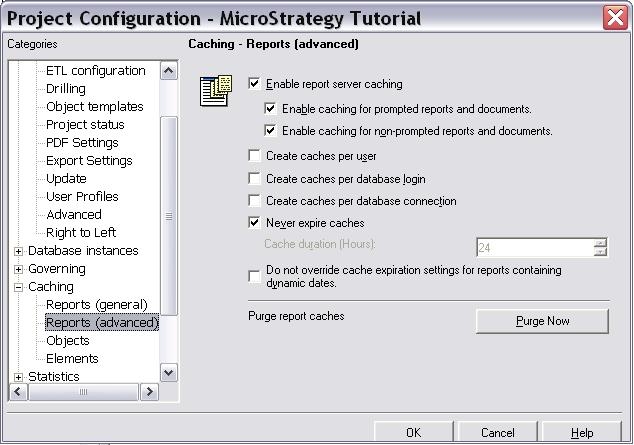
Use server cache

Save all changes, log into Strategy Web, and ensure that cache is being hit when executing reports.
