EducationSoftwareStrategy.com
StrategyCommunity

Knowledge Base

Product

Community

Knowledge Base

TopicsBrowse ArticlesDeveloper Zone

Product

Download SoftwareProduct DocumentationSecurity Hub

Education

Tutorial VideosSolution GalleryEducation courses

Community

GuidelinesGrandmastersEvents
x_social-icon_white.svglinkedin_social-icon_white.svg
Strategy logoCommunity

© Strategy Inc. All Rights Reserved.

LegalTerms of UsePrivacy Policy
  1. Home
  2. Topics

KB20363: How do non-aggregatable metrics work in MicroStrategy SQL Generation Engine?


Community Admin

• Strategy


This article explains the basics of the non-aggregatable metric feature in MicroStrategy.

Some kinds of fact data are not valid for aggregation with respect to one or more dimensions. The classic example is inventory with respect to time. The fact that there were 300 units in inventory yesterday is not relevant to the 200 units in inventory today. Adding those values together results in an inflated total, 500, that does not reflect the actual size of the inventory. What is relevant, rather than the sum, is the last atomic inventory value in a given period of time.
In Strategy SQL Generation Engine, non-aggregatable metrics are used for this kind of calculation. Non-aggregatable metrics are defined using the dimensionality section of the metric editor. The "Grouping" property has six possible settings, of which four specify non-aggregating behavior:

  • Beginning (fact)
  • Ending (fact)
  • Beginning (lookup)
  • Ending (lookup)

"Fact" and "lookup" define how the first or last atomic value is identified within the period. "Fact" means to use the first/last existing value in the fact table, while "lookup" goes to the first or last child element of the element to be displayed on the report. For example, a fact table might contain data such as the following:
 

1 Byte
WH or MD Database EncodingKANJISJIS_0SUTF8WHKANJISJIS_0SUTF8MDUTF8UTF8WH or MD Database EncodingKANJISJIS_0SUTF8WHKANJISJIS_0SUFT8MDUTF8UTF8Quarter_IDMonth_IDFact20061200601102006120060220200612006033020062200604402006220060550

1 Byte
WH or MD Database EncodingKANJISJIS_0SUTF8WHKANJISJIS_0SUTF8MDUTF8UTF8WH or MD Database EncodingKANJISJIS_0SUTF8WHKANJISJIS_0SUFT8MDUTF8UTF8Quarter_IDMonth_IDFact20061200601102006120060220200612006033020062200604402006220060550

1 Byte
WH or MD Database EncodingKANJISJIS_0SUTF8WHKANJISJIS_0SUTF8MDUTF8UTF8WH or MD Database EncodingKANJISJIS_0SUTF8WHKANJISJIS_0SUFT8MDUTF8UTF8Quarter_IDMonth_IDFact20061200601102006120060220200612006033020062200604402006220060550

1 Byte
WH or MD Database EncodingKANJISJIS_0SUTF8WHKANJISJIS_0SUTF8MDUTF8UTF8WH or MD Database EncodingKANJISJIS_0SUTF8WHKANJISJIS_0SUFT8MDUTF8UTF8Quarter_IDMonth_IDFact20061200601102006120060220200612006033020062200604402006220060550

1 Byte
WH or MD Database EncodingKANJISJIS_0SUTF8WHKANJISJIS_0SUTF8MDUTF8UTF8WH or MD Database EncodingKANJISJIS_0SUTF8WHKANJISJIS_0SUFT8MDUTF8UTF8Quarter_IDMonth_IDFact20061200601102006120060220200612006033020062200604402006220060550

1 Byte
WH or MD Database EncodingKANJISJIS_0SUTF8WHKANJISJIS_0SUTF8MDUTF8UTF8WH or MD Database EncodingKANJISJIS_0SUTF8WHKANJISJIS_0SUFT8MDUTF8UTF8Quarter_IDMonth_IDFact20061200601102006120060220200612006033020062200604402006220060550

1 Byte
WH or MD Database EncodingKANJISJIS_0SUTF8WHKANJISJIS_0SUTF8MDUTF8UTF8WH or MD Database EncodingKANJISJIS_0SUTF8WHKANJISJIS_0SUFT8MDUTF8UTF8Quarter_IDMonth_IDFact20061200601102006120060220200612006033020062200604402006220060550

1 Byte
WH or MD Database EncodingKANJISJIS_0SUTF8WHKANJISJIS_0SUTF8MDUTF8UTF8WH or MD Database EncodingKANJISJIS_0SUTF8WHKANJISJIS_0SUFT8MDUTF8UTF8Quarter_IDMonth_IDFact20061200601102006120060220200612006033020062200604402006220060550

1 Byte
WH or MD Database EncodingKANJISJIS_0SUTF8WHKANJISJIS_0SUTF8MDUTF8UTF8WH or MD Database EncodingKANJISJIS_0SUTF8WHKANJISJIS_0SUFT8MDUTF8UTF8Quarter_IDMonth_IDFact20061200601102006120060220200612006033020062200604402006220060550

1 Byte
WH or MD Database EncodingKANJISJIS_0SUTF8WHKANJISJIS_0SUTF8MDUTF8UTF8WH or MD Database EncodingKANJISJIS_0SUTF8WHKANJISJIS_0SUFT8MDUTF8UTF8Quarter_IDMonth_IDFact20061200601102006120060220200612006033020062200604402006220060550

1 Byte
WH or MD Database EncodingKANJISJIS_0SUTF8WHKANJISJIS_0SUTF8MDUTF8UTF8WH or MD Database EncodingKANJISJIS_0SUTF8WHKANJISJIS_0SUFT8MDUTF8UTF8Quarter_IDMonth_IDFact20061200601102006120060220200612006033020062200604402006220060550

1 Byte
WH or MD Database EncodingKANJISJIS_0SUTF8WHKANJISJIS_0SUTF8MDUTF8UTF8WH or MD Database EncodingKANJISJIS_0SUTF8WHKANJISJIS_0SUFT8MDUTF8UTF8Quarter_IDMonth_IDFact20061200601102006120060220200612006033020062200604402006220060550

1 Byte
WH or MD Database EncodingKANJISJIS_0SUTF8WHKANJISJIS_0SUTF8MDUTF8UTF8WH or MD Database EncodingKANJISJIS_0SUTF8WHKANJISJIS_0SUFT8MDUTF8UTF8Quarter_IDMonth_IDFact20061200601102006120060220200612006033020062200604402006220060550

1 Byte
WH or MD Database EncodingKANJISJIS_0SUTF8WHKANJISJIS_0SUTF8MDUTF8UTF8WH or MD Database EncodingKANJISJIS_0SUTF8WHKANJISJIS_0SUFT8MDUTF8UTF8Quarter_IDMonth_IDFact20061200601102006120060220200612006033020062200604402006220060550

1 Byte
WH or MD Database EncodingKANJISJIS_0SUTF8WHKANJISJIS_0SUTF8MDUTF8UTF8WH or MD Database EncodingKANJISJIS_0SUTF8WHKANJISJIS_0SUFT8MDUTF8UTF8Quarter_IDMonth_IDFact20061200601102006120060220200612006033020062200604402006220060550

1 Byte
WH or MD Database EncodingKANJISJIS_0SUTF8WHKANJISJIS_0SUTF8MDUTF8UTF8WH or MD Database EncodingKANJISJIS_0SUTF8WHKANJISJIS_0SUFT8MDUTF8UTF8Quarter_IDMonth_IDFact20061200601102006120060220200612006033020062200604402006220060550

1 Byte
WH or MD Database EncodingKANJISJIS_0SUTF8WHKANJISJIS_0SUTF8MDUTF8UTF8WH or MD Database EncodingKANJISJIS_0SUTF8WHKANJISJIS_0SUFT8MDUTF8UTF8Quarter_IDMonth_IDFact20061200601102006120060220200612006033020062200604402006220060550

1 Byte
WH or MD Database EncodingKANJISJIS_0SUTF8WHKANJISJIS_0SUTF8MDUTF8UTF8WH or MD Database EncodingKANJISJIS_0SUTF8WHKANJISJIS_0SUFT8MDUTF8UTF8Quarter_IDMonth_IDFact20061200601102006120060220200612006033020062200604402006220060550

No data exist for June 2006. An ending fact metric would return 30 for Q1 2006 and 50 for Q2 2006; the corresponding ending lookup metric would return 30 for Q1 2006, but the value for Q2 2006 would be null. This is because the lookup table identifies June 2006 as the last month in the second quarter, but the fact table does not have any data for that month.
Dimensionality vs. fact table attributes
The actual calculation level of a non-aggretable metric will be the lowest level attribute from the non-aggregatable hierarchy that is present on the fact table. If the fact table includes the Day attribute, day-level values would be the result. If, instead, Month is the lowest fact table level, then the metric would produce month-level values.The level of the first or last "x" within "y" depends on the granularity of the fact table.
If fact tables exist at multiple levels within a non-aggregatable hierarchy, the attribute chosen as the dimensionality target determines the calculation level by influencing the selection of the fact table. If Month is the target attribute, the Engine will never choose a fact table at a higher level than Month (never Quarter or Year). Thus the first or last month-level value will be presented in the report.
Note: The final determination of the calculation level is based on the fact table. The Engine uses normal fact table selection logic for non-aggregatable metrics, taking into account dimensionality and filtering attributes. The Engine will revert to a lower-level fact table if that is the only way to support all of the grouping and filtering attributes. For example, if a metric indicates non-aggregatable dimensionality at the level of Month, but a report includes attributes that require a day-level fact table, the day-level table will be used. Even though the metric specified Month level, the report will display the first or last day's value within the time period because the fact table demands it.
Beginning/ending (fact) dimensionality
Beginning or ending (fact) metrics calculate according to the following procedure:

  1. Calculate the metric, including both the dimensional level attribute ("parent") and the fact table level attribute ("child"). Including the fact table level attribute at this stage ensures that the non-aggregatable hierarchy will not be subject to aggregation.
  2. For each "parent" element, find the first or last "child" element that exists in step 1.
  3. The metric's final result is the intersection of steps 1 and 2.

For example, an "End on Hand" metric may be defined with the following dimensionality. Month is used as the dimensional attribute because the fact exists at the level of Month.
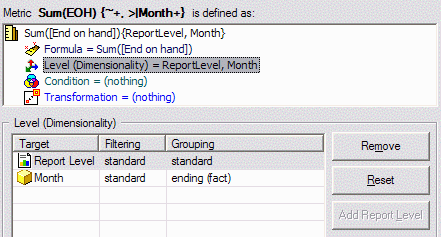
ka0PW0000000zebYAA_0EM440000002EeB.gif

A report calculating this metric over Quarters generates the following SQL. (Note that a filter restricts the results to one quarter. This is because the Strategy Tutorial project uses a partitioned fact table for the End on Hand fact. The filter reduces the size of the SQL and makes a better illustration.)
// Partitioning pre-query -- this is independent of non-aggregatable metrics
select distinct a11.PBTNAME PBTNAME
from PMT_INVENTORY a11
where a11.QUARTER_ID in (20074)
// Month-level values, with Quarter ID included
select a12.QUARTER_ID QUARTER_ID,
   a11.MONTH_ID MONTH_ID,
   sum(a11.EOH_QTY) WJXBFS1
into #ZZTTS0200F6PO000
from INVENTORY_Q4_2007 a11
   join LU_MONTH a12
      on (a11.MONTH_ID = a12.MONTH_ID)
where a12.QUARTER_ID in (20074)
group by a12.QUARTER_ID,
   a11.MONTH_ID
// What is the last Month found in the metric table for each Quarter?
select pc11.QUARTER_ID QUARTER_ID,
   max(pc11.MONTH_ID) WJXBFS1
into #ZZTTS0200F6MB001
from #ZZTTS0200F6PO000 pc11
group by pc11.QUARTER_ID
// Intersect (inner join) the tables to preserve only the last Month's value from each Quarter
select distinct pa11.QUARTER_ID QUARTER_ID,
   a13.QUARTER_DESC QUARTER_DESC,
   pa11.WJXBFS1 WJXBFS1
from #ZZTTS0200F6PO000 pa11
   join #ZZTTS0200F6MB001 pa12
      on (pa11.MONTH_ID = pa12.WJXBFS1 and
      pa11.QUARTER_ID = pa12.QUARTER_ID)
   join LU_QUARTER a13
      on (pa11.QUARTER_ID = a13.QUARTER_ID)
drop table #ZZTTS0200F6PO000
drop table #ZZTTS0200F6MB001
Beginning/ending (lookup) dimensionality
Beginning or ending (lookup) metrics follow a slightly different procedure.
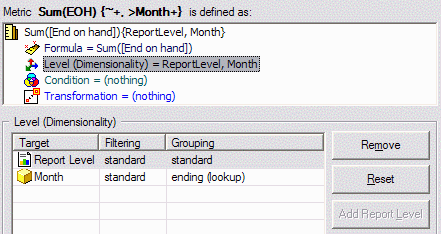
  1. Create a table containing the first or last child elements (fact table level) corresponding on the parent elements to be displayed (dimensional level). Note that there is no need to include the parent attribute in the SELECT clause of this pass, because the pass will be used only for filtering the fact table. (The parent attribute is in the GROUP BY clause.)
  2. Calculate the metric, grouping by the dimensional level attribute ("parent") but filtering according to the child elements from step 1.
ka0PW0000000zebYAA_0EM440000002EeM.gif

// Determine the latest Months in each Quarter, according to lookup table
select max(c11.MONTH_ID) MONTH_ID
into #ZZTTS0200GZOP000
from LU_MONTH c11
where c11.QUARTER_ID in (20074)
group by c11.QUARTER_ID
// Partitioning pre-query -- this is independent of non-aggregatable metrics
select distinct a11.PBTNAME PBTNAME
from PMT_INVENTORY a11
where a11.QUARTER_ID in (20074)
// Calculate the metric, filtering on the set of last months in their quarters
select a13.QUARTER_ID QUARTER_ID,
   max(a14.QUARTER_DESC) QUARTER_DESC,
   sum(a11.EOH_QTY) WJXBFS1
from INVENTORY_Q4_2007 a11
   join #ZZTTS0200GZOP000 pa12
      on (a11.MONTH_ID = pa12.MONTH_ID)
   join LU_MONTH a13
      on (a11.MONTH_ID = a13.MONTH_ID)
   join LU_QUARTER a14
      on (a13.QUARTER_ID = a14.QUARTER_ID)
where a13.QUARTER_ID in (20074)
group by a13.QUARTER_ID
drop table #ZZTTS0200GZOP000


Comment

0 comments

Details

Knowledge Article

Published:

April 3, 2017

Last Updated:

February 27, 2024