The following code will execute a report in the Metadata and loop through the different attribute elements and metric values:
package com.Strategy.standalone;

import com.Strategy.web.beans.ReportBean;
import com.Strategy.web.beans.WebBeanFactory;
import com.Strategy.web.objects.EnumWebRowValueType;
import com.Strategy.web.objects.WebHeaders;
import com.Strategy.web.objects.WebIServerSession;
import com.Strategy.web.objects.WebObjectsFactory;
import com.Strategy.web.objects.WebReportGrid;
import com.Strategy.web.objects.WebRow;
import com.Strategy.web.objects.WebSessionInfo;

public class ExecuteReport {

 /**
  * @param args
  */
 public static void main(String[] args) {
  try {
   // Connect to Strategy IS
   WebObjectsFactory factory = WebObjectsFactory.getInstance();
   WebIServerSession session = factory.getIServerSession();
   session.setServerName("localhost");
   session.setLogin("Administrator");
   session.setPassword("");
   session.setProjectName("Strategy Tutorial");
   String sID = session.getSessionID();

   // Create a WebBean factory
   WebBeanFactory bFactory = WebBeanFactory.getInstance();
   ReportBean rb = (ReportBean) bFactory.newBean("report");
   rb.setSessionInfo((WebSessionInfo)session);

   // Instantiate a report
   rb.setObjectID("30E9353B44895723B0CEF3AA73A70530"); // Item Contribution (5 metrics)
   // Run the report
   rb.collectData();

   System.out.println("Data collected");

   WebReportGrid wrg = rb.getReportInstance().getResults().getWebReportGrid();

   for (int i=0; i<wrg.getGridRows().size();i++){

    WebHeaders webHeaders = wrg.getRowHeaders().get(i);
    WebRow webrow = wrg.getGridRows().get(i);

    for (int j=0; j<webHeaders.size(); j++) {
      System.out.println(webHeaders.get(j).getTitle().getTarget().getDisplayName() + ": " + webHeaders.get(j).getDisplayName());
    }

    //Metric Values for each row
    for (int x=0;x<webrow.size();x++){
     if (webrow.get(x).getType() == EnumWebRowValueType.METRIC){
      System.out.println(webrow.get(x).getColumnHeader().getDisplayName() + ": " + webrow.get(x).getValue());
     }
     else

      System.out.println("Total " + wrg.getColumnHeaders().get(0).get(x).getDisplayName() + ": " + webrow.get(x).getValue());
    }

   }

   // Bye bye
   session.closeSession();
  } catch (Exception e) {
   System.out.println(e.getMessage());
   e.printStackTrace(System.out);
  }


 }

}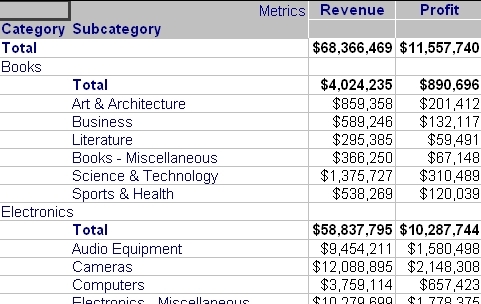
Will return the following output:
Category: Total
Subcategory:
Total Revenue: $68,366,469
Total Profit: $11,557,740
Category: Books
Subcategory: Total
Total Revenue: $4,024,235
Total Profit: $890,696
Subcategory: Art & Architecture
Revenue: $859,358
Profit: $201,412
Subcategory: Business
Revenue: $589,246
Profit: $132,117
Subcategory: Literature
Revenue: $295,385
Profit: $59,491
Subcategory: Books - Miscellaneous
Revenue: $366,250
Profit: $67,148
Subcategory: Science & Technology
Revenue: $1,375,727
Profit: $310,489
.........
The code attached to this Technical Note loops through each of the rows in the grid and reads every cells value and header value to build the output:
[Cell header value]:[Cell Value]
if (webrow.get(x).getType() == EnumWebRowValueType.METRIC){}webrow.get(x).getColumnHeader().getDisplayName()
wrg.getColumnHeaders().get(0).get(x).getDisplayName()
PREREQUISITES:
For the sample to work, the Strategy Web JAR files must be accessible by the Java Runtime
Environment. The Strategy Web JAR files can be found under:
Note:
More elaborate programs will require additional library files and are out of the scope of this document.
ADDITIONAL INFORMATION:
The Strategy SDK allows you to customize several Strategy products and extend and integrate the Strategy business intelligence functionality into other applications. However, before changing the way Strategy products look or behave, it is helpful to understand how the application is built. For more information regarding the Strategy products or the process of customizing Strategy products, please refer to the MicroStrategy Developer Hub.
To access the Strategy Developer Hub, you must have access to the Strategy Knowledge Base, you must have purchased the Strategy SDK, and you must be current on your Strategy maintenance agreement. If you are a US-based business and believe that you satisfy all three of these conditions but you do not have access to the Strategy Developer Hub, please contact Strategy Technical Support at support@Strategy.com or at (703) 848-8700. If you are an international business, please contact Strategy Technical Support at the appropriate email address or phone number found at https://www.Strategy.com/us/services/support/contact.
CUSTOMIZATION WARNING:
This customization is provided as a convenience to Strategy users and is only directly applicable to the version stated. While this code may apply to other releases directly, Strategy Technical Support makes no guarantees that the code provided will apply to any future or previous builds. In the event of a code change in future builds, Strategy Technical Support makes no guarantee that an updated version of this particular customization will be provided. In the event of a code change in future builds, Strategy may not be able to provide additional code on this matter even though this customization is provided at this time for this specific build. For enhancements to this customization or to incorporate similar functionality into other versions, contact your Account Executive to inquire about Strategy Consulting assistance.
