EducationSoftwareStrategy.com
StrategyCommunity

Knowledge Base

Product

Community

Knowledge Base

TopicsBrowse ArticlesDeveloper Zone

Product

Download SoftwareProduct DocumentationSecurity Hub

Education

Tutorial VideosSolution GalleryEducation courses

Community

GuidelinesGrandmastersEvents
x_social-icon_white.svglinkedin_social-icon_white.svg
Strategy logoCommunity

© Strategy Inc. All Rights Reserved.

LegalTerms of UsePrivacy Policy
  1. Home
  2. Topics

KB20409: How to create a metric qualification that includes some of the associated qualifications but ignores others in MicroStrategy SQL Generation Engine


Community Admin

• Strategy


This article notes a method to create metric qualifications that apply some associated filters but not all

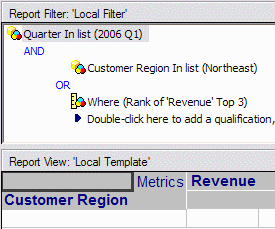
A report needs to be created in the Strategy Tutorial project that will show Q1 2006 revenue for the top three ranking Customer Regions in terms of Q1 2006 Revenue, along with the Northeast region regardless of Revenue.
 
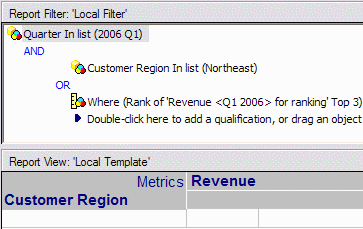
A report such as the following does not return the expected result, for the reason described in the below-referenced Strategy Knowledgebase document. The results include only the Northeast Customer Region, when at least three regions are expected from the ranking qualification.
 
KB20408: A metric or other set qualification combined with an attribute qualification using OR returns the results that would be obtained with AND in Strategy SQL Generation Engine
ka04W000000OhPDQA0_0EM440000002Ebv.gif


CAUSE
 
The report returns data for the Northeast region only because the ranking qualification includes the Customer Region filter in its calculation by default, according to KB20408, which describes the set qualification advanced option, "When resolving this qualification in a report, other qualifications will be taken into consideration and merged."
 
In this case, both filters (Customer Region and Quarter) are incorporated into the ranking qualification pass. Since the OR conjunction is between the Customer Region and ranking qualifications, it is not valid for the ranking qualification pass to use OR. Assuming the following qualifications:
 

  • Q1 = Customer Region in (Northeast)
  • Q2 = Where (Rank of 'Revenue' Top 3)
  • Q3 = Quarter in (2006 Q1)

The report filter structure is ((Q1 or Q2) and Q3). The "other qualifications" to apply to the ranking qualification, then, are ((Q1) and Q3).
 
ACTION
 
This report needs to consider the other qualification Q3 in the ranking filter, but use Q1 only when calculating the template metric. There are two ways to do this:

 

  • Create a standalone filter containing the Quarter condition, and use this filter as the metric condition for a second Revenue metric, which will be used only for ranking. The rank qualification should set the "other qualifications" advanced option to be disabled.
     
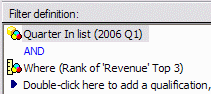
    Quarter filter:
ka04W000000OhPDQA0_0EM440000002Ebq.gif
  •  
    Report design (note that the filtered metric is used in the ranking qualification):
ka04W000000OhPDQA0_0EM440000002Eby.gif
  •  
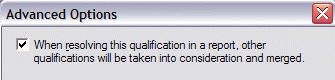
    Ranking qualification advanced option:
ka04W000000OhPDQA0_0EM440000002Ebu.gif
  • Create a standalone filter containing the ranking and Quarter conditions -- i.e., (Q2 and Q3). Within this filter, set the ranking qualification to include other qualifications. Because the ranking qualification exists within a saved filter object, the setting will apply to the other qualifications inside this filter only. Other conditions in the report filter will be ignored.
     
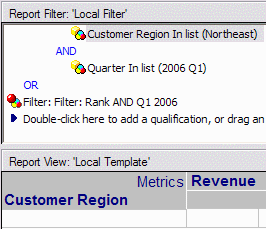
    The main report should then define the filter as follows. The standalone filter should be added as a shortcut, and the "other qualifications" advanced option for the filter shortcut should be disabled. (It is the same advanced option as in the metric qualification, but applied to a shortcut to filter.)
     
    It is necessary to repeat the Quarter qualification because of the filter structure. Without repeating it, the structure is (Q1 or (Q2 and Q3)), and this is not the same as ((Q1 or Q2) and Q3). With the repeat, it is ((Q1 and Q3) or (Q2 and Q3)), which is identical in the same way that (a+b)*c = (a*c) + (b*c).
     
    Saved filter:
ka04W000000OhPDQA0_0EM440000002Ebt.gif
  •  
    Ranking qualification advanced option:
ka04W000000OhPDQA0_0EM440000002Ec0.gif
  •  
    Report design:
ka04W000000OhPDQA0_0EM440000002Ebr.gif
  •  
    Saved filter advanced option:
ka04W000000OhPDQA0_0EM440000002Ebu.gif

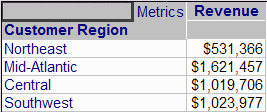
Both alternatives produce the same correct result.
 

ka04W000000OhPDQA0_0EM440000002Ebs.gif


Comment

0 comments

Details

Knowledge Article

Published:

May 23, 2017

Last Updated:

May 23, 2017