EducationSoftwareStrategy.com
StrategyCommunity

Knowledge Base

Product

Community

Knowledge Base

TopicsBrowse ArticlesDeveloper Zone

Product

Download SoftwareProduct DocumentationSecurity Hub

Education

Tutorial VideosSolution GalleryEducation courses

Community

GuidelinesGrandmastersEvents
x_social-icon_white.svglinkedin_social-icon_white.svg
Strategy logoCommunity

© Strategy Inc. All Rights Reserved.

LegalTerms of UsePrivacy Policy
  1. Home
  2. Topics

KB204230: Contacts are invisible when users select recipients on MicroStrategy Analytics Developer 9.4.1 and above


Stefan Zepeda

Salesforce Solutions Architect • Strategy


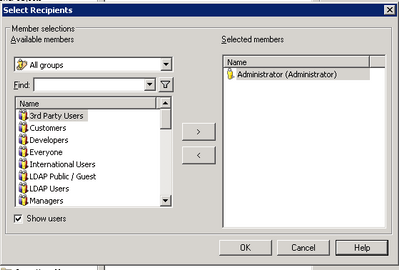
When creating subscriptions on MicroStrategy Analytic Developer, users are unable to add contacts or contact groups into recipients list. Only users and user groups are allowed to be added as per design because it is user/user group that uses Mobile, Cache update or History list subscriptions.

SYMPTOM:
When creating subscriptions on Strategy Analytic Developer, users are unable to add contacts or contact groups into recipients list. Only users and user groups are allowed to add, as shown below.
ka02R000000kcNBQAY_0EM4400000029KU.jpeg

 
CAUSE:
There is no need to add contacts/contact groups as recipients, because it is user/user group that uses Mobile, Cache update or History list subscriptions.
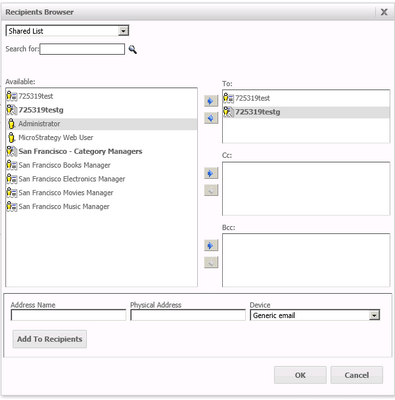
A contact is a Strategy object that represents a delivery address (an email address, a file storage location on a network, or a network printer path), so users are able to add contacts/contact groups into recipients list when editing email subscription or file subscription, as shown below.
ka02R000000kcNBQAY_0EM4400000029KW.jpeg

Both email and file subscription editors are available on Web, not Developer
ACTION:
Add users/user groups into recipients list when editing Mobile, Cache update or History list subscriptions on Developer.


Comment

0 comments

Details

Knowledge Article

Published:

May 4, 2017

Last Updated:

May 4, 2017