EducationSoftwareStrategy.com
StrategyCommunity

Knowledge Base

Product

Community

Knowledge Base

TopicsBrowse ArticlesDeveloper Zone

Product

Download SoftwareProduct DocumentationSecurity Hub

Education

Tutorial VideosSolution GalleryEducation courses

Community

GuidelinesGrandmastersEvents
x_social-icon_white.svglinkedin_social-icon_white.svg
Strategy logoCommunity

© Strategy Inc. All Rights Reserved.

LegalTerms of UsePrivacy Policy
  1. Home
  2. Topics

KB204240: Error " Searching for 'xxx' resulted in no matches " occurs when creating security filter with qualification on attribute form expression via MicroStrategy Analytics Command Manager 9.4.1


Community Admin

• Strategy


Error message ‘Searching for 'xxx' resulted in no matches.’ is seen when the user attempts to execution following script to create security filter with qualification on attribute form expression via MicroStrategy Analytics Command Manager 9.4.1

SYMPTOM:
Error message ‘Searching for 'xxx' resulted in no matches.’ is seen when the user attempts to execution following script to create security filter with qualification on attribute form expression via Strategy Analytics Command Manager 9.4.1, as shown below:

ka04W000000OfUWQA0_0EM440000002CDy.jpeg


CREATE SECURITY FILTER"CategoryBook1"FOLDER"\Project Objects\MD Security Filters\"IN PROJECT"Strategy Tutorial"EXPRESSION "Category@DESC=Books"; 
 And get the error message below:
 (Searching for 'Books' resulted in no matches.) Task(s) execution completed with errors.
 
CAUSE:
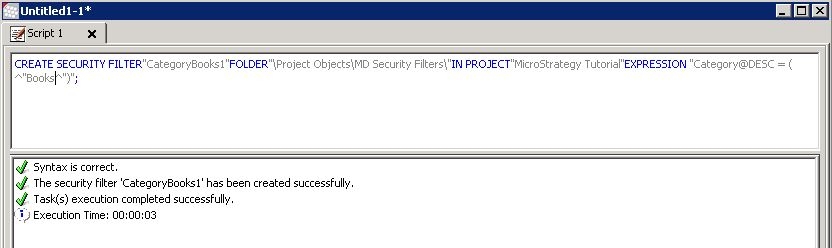
The syntax to present the form expression is incorrect.
 
ACTION:
The non-number format strings for attribute form should be enclosed with ^”. The correct syntax should be as follows:

ka04W000000OfUWQA0_0EM440000002CDw.jpeg


CREATE SECURITY FILTER"CategoryBooks"FOLDER"\Project Objects\MD Security Filters\"IN PROJECT"Strategy Tutorial"EXPRESSION "Category@DESC = ( ^"Books^")";


Comment

0 comments

Details

Knowledge Article

Published:

April 6, 2017

Last Updated:

April 6, 2017