SYMPTOM:
A user has created a procedure in Command Manager to print out the result set of "LIST ALL PROPERTIES FOR SUBSCRIPTION GUID "+guid+" FOR PROJECT 'xxxx';". Null values are returned after the execution though the script has passed compilation, as shown below.
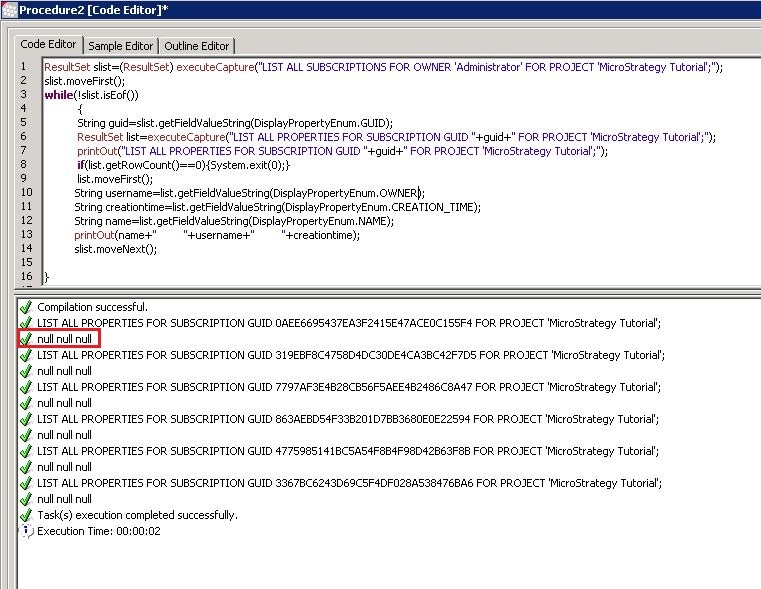
STEPS TO REPRODUCE:
The following steps are performed in Tutorial project.
ResultSet slist=(ResultSet) executeCapture("LIST ALL SUBSCRIPTIONS FOR OWNER
'Administrator' FOR PROJECT 'Strategy Tutorial';");
slist.moveFirst();
while(!slist.isEof())

      {
      String guid=slist.getFieldValueString(DisplayPropertyEnum.GUID);
      ResultSet list=executeCapture("LIST ALL PROPERTIES FOR SUBSCRIPTION GUID "+guid+"
      FOR   PROJECT 'Strategy Tutorial';");
      printOut("LIST ALL PROPERTIES FOR SUBSCRIPTION GUID "+guid+" FOR PROJECT
      'Strategy Tutorial';");
      if(list.getRowCount()==0){System.exit(0);}
      list.moveFirst();
      String username=list.getFieldValueString(DisplayPropertyEnum.OWNER);
      String creationtime=list.getFieldValueString(DisplayPropertyEnum.CREATION_TIME);
      String name=list.getFieldValueString(DisplayPropertyEnum.NAME);
      printOut(name+"         "+username+"         "+creationtime);
      slist.moveNext();
      }
CAUSE:
The data structure for subscription result set has been changed whereas the usage guidance has not been updated in Command Manager documentation. Therefore the syntax used this case is incorrect.
ACTION:
An enhancement request has been logged to update the data structure for subscription result set.
Following two lines should be added to the script.
ResultSet oResultSetSubProps = (ResultSet)list.getResultCell(SUBSCRIPTION_RESULT_SET).getValue();
oResultSetSubProps.moveFirst();
ResultSet slist=(ResultSet) executeCapture("LIST ALL SUBSCRIPTIONS FOR OWNER 'Administrator' FOR PROJECT 'Strategy Tutorial';");
slist.moveFirst();
while(!slist.isEof())

      {
      String guid=slist.getFieldValueString(DisplayPropertyEnum.GUID);
      ResultSet list=executeCapture("LIST ALL PROPERTIES FOR SUBSCRIPTION GUID "+guid+" FOR PROJECT 'Strategy Tutorial';");
      printOut("LIST ALL PROPERTIES FOR SUBSCRIPTION GUID "+guid+" FOR PROJECT 'Strategy Tutorial';");
      if(list.getRowCount()==0){System.exit(0);}
      list.moveFirst();
      ResultSet oResultSetSubProps = (ResultSet)list.getResultCell(SUBSCRIPTION_RESULT_SET).getValue();
      oResultSetSubProps.moveFirst();
      String username=oResultSetSubProps.getFieldValueString(DisplayPropertyEnum.OWNER);
      String creationtime=oResultSetSubProps.getFieldValueString(DisplayPropertyEnum.CREATION_TIME);
      String name=oResultSetSubProps.getFieldValueString(DisplayPropertyEnum.NAME);
      printOut(name+"         "+username+"         "+creationtime);
      slist.moveNext();
      }
