EducationSoftwareStrategy.com
StrategyCommunity

Knowledge Base

Product

Community

Knowledge Base

TopicsBrowse ArticlesDeveloper Zone

Product

Download SoftwareProduct DocumentationSecurity Hub

Education

Tutorial VideosSolution GalleryEducation courses

Community

GuidelinesGrandmastersEvents
x_social-icon_white.svglinkedin_social-icon_white.svg
Strategy logoCommunity

© Strategy Inc. All Rights Reserved.

LegalTerms of UsePrivacy Policy
  1. Home
  2. Topics

KB204394: "The session has expired. Go back and run the report again to interact with it." error message appears when using URL API to launch a report from an external app in MicroStrategy Mobile 9.4.1 iOS Update 3.


Community Admin

• Strategy


This document discusses about a known issue that "The session has expired. Go back and run the report again to interact with it." error message appears when using URL API to launch a report from an external app in MicroStrategy Mobile iOS application.

SYMPTOM:
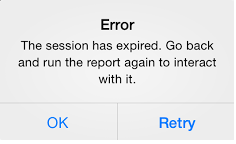
In Strategy Mobile 9.4.1 iOS Update 3, users can use URL API to execute a specific Strategy report by using the event "evt=4001". This hyperlink can be accessed from within the Strategy Mobile app, or externally in order to trigger the app. However, using this hyperlink repeatedly may lead to the following error:


ka04W000000OhonQAC_0EM440000002A2g.jpeg


Error


The session has expired. Go back and run the report again to interact with it.


STEPS TO REPRODUCE:

  1. Create a report in Strategy Web9.4.1, and note down the report ID.
  2. Create a URL using the form
    
    mstr://?evt=4001&reportID=xxx

    Note: replace "xxx" with the report ID.
  3. Email this link to a mobile device that has the Strategy Mobile 9.4.1 iOS Update 3 app.
  4. From the Mail app on the mobile device, click on the link. Notice this triggers the Strategy Mobile 9.4.1 iOS Update 3 app, and displays the specified report.
  5. Go back to the email and click the link again. Repeat this process until the error message is triggered.

CAUSE:
This is a known issue in Strategy Mobile 9.4.1 Update 3, that did not occur in Strategy Mobile 9.4.1 Update 2.
 
ACTION:
This issue has been addressed in Strategy Mobile 9.4.1 iOS Update 4. Upgrade to this version to take advantage of this fix.
 
The Strategy Internal Reference Number for the issue discussed in this technical note is 957127.


Comment

0 comments

Details

Knowledge Article

Published:

April 11, 2017

Last Updated:

April 11, 2017