EducationSoftwareStrategy.com
StrategyCommunity

Knowledge Base

Product

Community

Knowledge Base

TopicsBrowse ArticlesDeveloper Zone

Product

Download SoftwareProduct DocumentationSecurity Hub

Education

Tutorial VideosSolution GalleryEducation courses

Community

GuidelinesGrandmastersEvents
x_social-icon_white.svglinkedin_social-icon_white.svg
Strategy logoCommunity

© Strategy Inc. All Rights Reserved.

LegalTerms of UsePrivacy Policy
  1. Home
  2. Topics

KB204418: "Edit Links" feature is not working in Interactive and Editable Mode in MicroStrategy Web


Community Admin

• Strategy


This Article describes a MicroStrategy Web 9.4.1-10.x feature misuse. It has the potential to impact any user who uses the "Edit Links" functionality. If a metric in a grid inside a document is configured as a link using "Edit Links" and doesn't have a default link selected, then the link will not redirect the user to the configured content in Editable, Interactive mode and for 10.x presentation mode.

SUMMARY:
This Article describes a Strategy Web 9.4.1-10.x feature misuse. It has the potential to impact any user who uses the "Edit Links" functionality. If a metric in a grid inside a document is configured as a link using "Edit Links" and doesn't have a default link selected, then the link will not redirect the user to the configured content in Editable, Interactive mode and presentation mode for version 10.x
 
SYMPTOM:
In Strategy 9.4.1 if a metric in a grid inside a document is configured as a link using "Edit Links" and doesn't have a default link selected, then the link will not redirect the user to the configured content in Editable and Interactive mode.
 
STEPS TO REPRODUCE:
  • Inside the Tutorial Project in Strategy Web create a report with the Category attribute in rows and Profit metric.
  • Create a Document and insert the dataset of step 1.
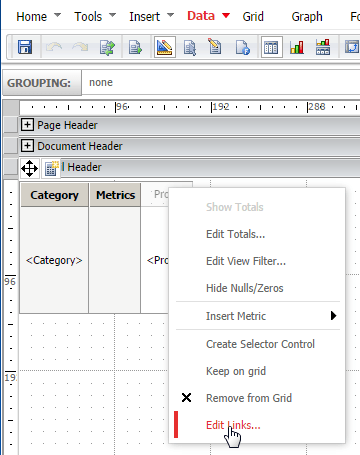
  • Right click on the header of the Profit metric and configure it as a link with the "Edit Links" feature.
ka04W000001488OQAQ_0EM4400000025oq.jpeg
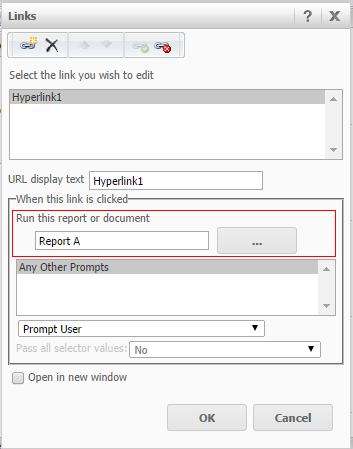
  • Point the link to the report of step 1.
ka04W000001488OQAQ_0EM4400000025p1.jpeg
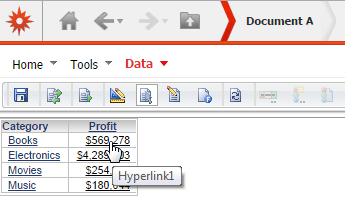
  • Run the document in Interactive Mode and note that the link is working when mouse is over the Profit metric.
ka04W000001488OQAQ_0EM4400000025op.jpeg
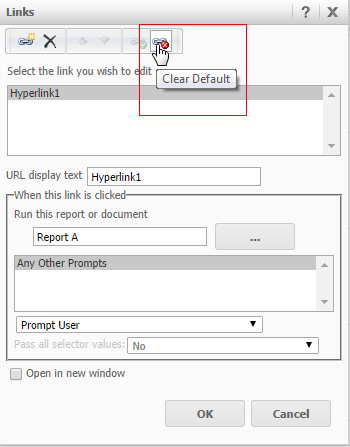
  • Edit the link again and clear the default link by click the red button like shown below:
ka04W000001488OQAQ_0EM4400000025oy.jpeg
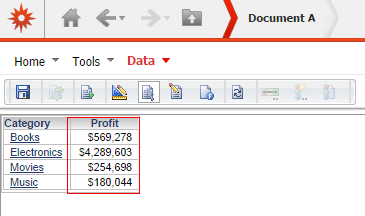
  • Run the document again in Interactive Mode and note that the link is not working like shown below:
ka04W000001488OQAQ_0EM4400000025os.jpeg
  • The link will not work in Editable Mode as well.

 
CAUSE:
The "Edit Links" feature is working as designed because it doesn't have a default link configured.
 
ACTION:
Configure a default link in the "Edit Links" feature by pressing the green button like shown below:
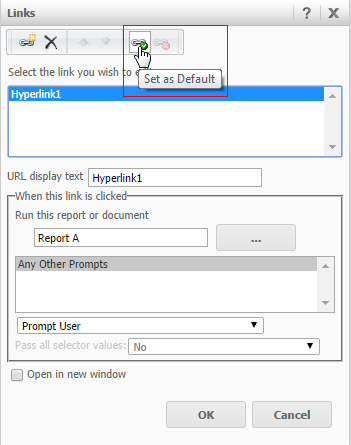
ka04W000001488OQAQ_0EM4400000025p0.jpeg


Comment

0 comments

Details

Knowledge Article

Published:

May 10, 2017

Last Updated:

May 10, 2017