EducationSoftwareStrategy.com
StrategyCommunity

Knowledge Base

Product

Community

Knowledge Base

TopicsBrowse ArticlesDeveloper Zone

Product

Download SoftwareProduct DocumentationSecurity Hub

Education

Tutorial VideosSolution GalleryEducation courses

Community

GuidelinesGrandmastersEvents
x_social-icon_white.svglinkedin_social-icon_white.svg
Strategy logoCommunity

© Strategy Inc. All Rights Reserved.

LegalTerms of UsePrivacy Policy
  1. Home
  2. Topics

KB204426: "Error saving and publising the Cube" message appears during Data Import when mapping an attribute with compound ID forms in MicroStrategy Web 9.4.1.


Community Admin

• Strategy


In MicroStrategy Web 9.4.1, users can map attributes during Data Import to existing attributes. If a user maps a Data Import column to an attribute that has compound ID forms

SYMPTOM:
In Strategy Web 9.4.1, users can map attributes during Data Import to existing attributes. If a user maps a Data Import column to an attribute that has compound ID forms, the following error message will appear:

ka04W000000OfksQAC_0EM4400000025vB.jpeg


Error saving and publising the Cube:com.Strategy.webapi.MSTRWebAPIException: (Cannot map an attribute whose ID form is compound. Attribute name: xxx)
 
STEPS TO REPRODUCE:

  • In Strategy Web 9.4.1, use "Import Data" to select an Excel file.
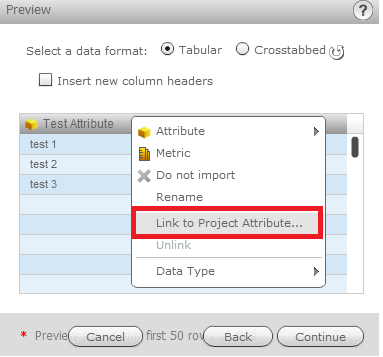
  • Choose one of the available attribute columns, and click the dropdown to navigate to "Link to Project Attribute...", as shown below:
ka04W000000OfksQAC_0EM4400000025v9.jpeg
  • Select a Project Attribute that has compound ID forms. Notice the error message.

CAUSE:
This is a current limitation in Strategy Web 9.4.1. It is not supported to map to project attributes with compound ID forms. A request has been logged to address this issue.
ACTION:
This issue has been fixed in Strategy Web 10.1. Take advantage of upgrading for a fix.


Comment

0 comments

Details

Knowledge Article

Published:

May 16, 2017

Last Updated:

January 22, 2018