EducationSoftwareStrategy.com
StrategyCommunity

Knowledge Base

Product

Community

Knowledge Base

TopicsBrowse ArticlesDeveloper Zone

Product

Download SoftwareProduct DocumentationSecurity Hub

Education

Tutorial VideosSolution GalleryEducation courses

Community

GuidelinesGrandmastersEvents
x_social-icon_white.svglinkedin_social-icon_white.svg
Strategy logoCommunity

© Strategy Inc. All Rights Reserved.

LegalTerms of UsePrivacy Policy
  1. Home
  2. Topics

KB204528: How to create a report that lists all the dates and related events happening on each date in MicroStrategy 9.x, if there are Day lookup table and another table that stores Events and their StartDate and EndDate in the data warehouse.


Community Admin

• Strategy


How to create a report that lists all the dates and related events happening on each date in MicroStrategy 9.x, if there are Day lookup table and another table that stores Events and their StartDate and EndDate in the data warehouse.

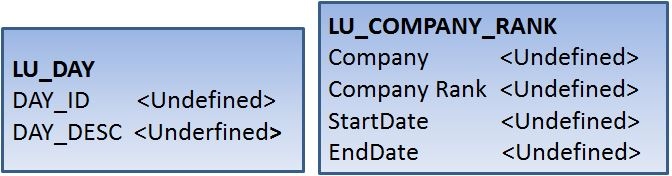
In some business scenarios, it is required to create a report listing all the dates and the related events happening on each date, when the records are not stored in the data warehouse directly. Instead, there are only two tables that are related: one table is LU_DAY which stores Day ID and DESC; the other is LU_COMPANY_RANK which stores the Company Name, relative Company Rank and its term of validity that is identified by StartDate and EndDate, as shown below.
ka04W000000Of6EQAS_0EM440000002CEP.jpeg

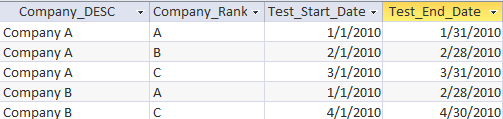
And the data in table LU_COMPANY_RANK is as below:
ka04W000000Of6EQAS_0EM440000002CEG.jpeg

 
Follow the steps below to create a report to meet the requirement:
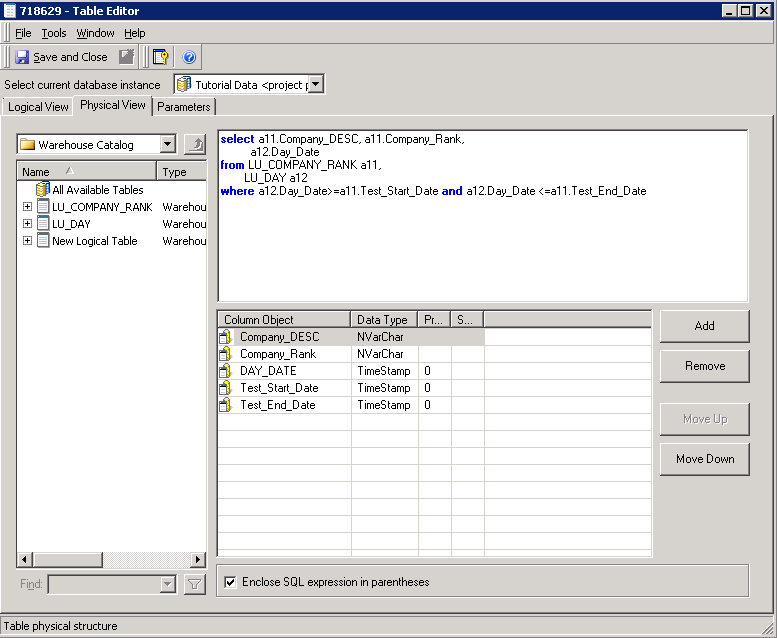
1. Create a logical view to join LU_DAY and LU_COMPANY_RANK. The key here is to get all the valid dates for each Company Rank by using the conditionality below:
Where a12.Day_Date>=a11.Test_Start_Date and a12.Day_date<=a11.Test_End_Date
ka04W000000Of6EQAS_0EM440000002CDq.jpeg


Select a11.Company_DESC, a11.Company_Rank,
       a12.Day_Date
from LU_COMPANY_RANK a11,
     LU_DAY a12
Where a12.Day_Date>=a11.Test_Start_Date and a12.Day_date<=a11.Test_End_Date
2. Based off the columns Company_DESC, Company_Rank and DAY_DATE in the logical view, create three attributes - Company, Company Rank and Day Date respectively;
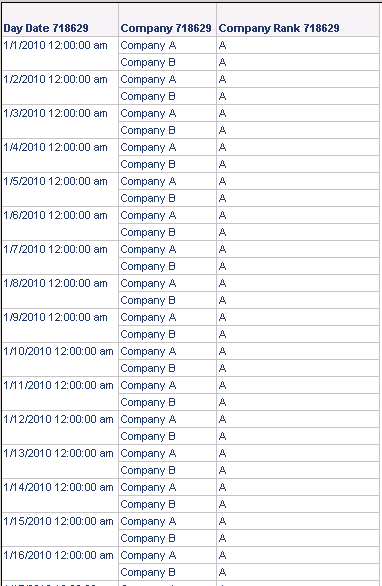
3. Create a table with above attributes and it returns result as expected. It means that: from 1/1/2010 to 1/31/2010, only Rank A for Company A and Rank A for Company B are valid; from 2/1/2010 to 2/28/2010 only Rank B for Company A and Rank A for Company B are valid (data not shown), and so on...

ka04W000000Of6EQAS_0EM440000002CEE.jpeg

Comment

0 comments

Details

Knowledge Article

Published:

June 8, 2017

Last Updated:

June 8, 2017