EducationSoftwareStrategy.com
StrategyCommunity

Knowledge Base

Product

Community

Knowledge Base

TopicsBrowse ArticlesDeveloper Zone

Product

Download SoftwareProduct DocumentationSecurity Hub

Education

Tutorial VideosSolution GalleryEducation courses

Community

GuidelinesGrandmastersEvents
x_social-icon_white.svglinkedin_social-icon_white.svg
Strategy logoCommunity

© Strategy Inc. All Rights Reserved.

LegalTerms of UsePrivacy Policy
  1. Home
  2. Topics

KB204546: How to determine the Week No. of a given date in that month if Monday is considered as the first day of a week in MicroStrategy Analytics Developer 10.x


Stefan Zepeda

Salesforce Solutions Architect • Strategy


KB204546: How to determine the Week No. of a given date in that month if Monday is considered as the first day of a week in MicroStrategy Analytics Developer 9.4.1

Strategy provides a “Week” function that returns the number of the week in the year of the input date. When using this function, Sunday is considered as the first day of a week by default. There might be some circumstance that needs to calculate the number of the week in the month of the input date, and requires Monday is the first day of a week.
Follow the steps below to achieve the requirement:
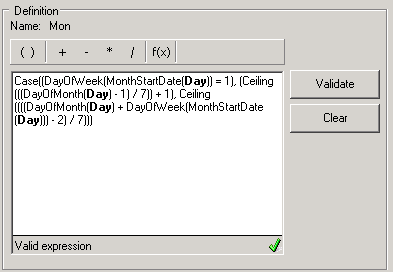
1. Create a metric as below:
ka02R000000kcLAQAY_0EM440000002CEI.jpeg


Case((DayOfWeek(MonthStartDate(Day)) = 1), (Ceiling(((DayOfMonth(Day) - 1) / 7)) + 1), Ceiling((((DayOfMonth(Day) + DayOfWeek(MonthStartDate(Day))) - 2) / 7)))
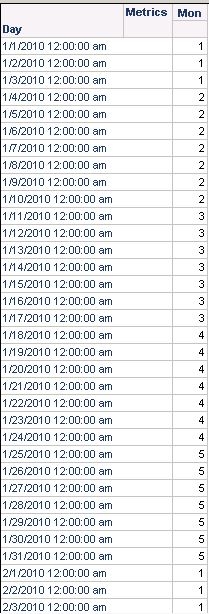
 2. If metric is designed this way, it shows the Week No. of the input date in that month, considering Monday is the first day of a week, as shown below:

ka02R000000kcLAQAY_0EM440000002CEJ.jpeg

]


Comment

0 comments

Details

Knowledge Article

Published:

May 9, 2017

Last Updated:

May 9, 2017