EducationSoftwareStrategy.com
StrategyCommunity

Knowledge Base

Product

Community

Knowledge Base

TopicsBrowse ArticlesDeveloper Zone

Product

Download SoftwareProduct DocumentationSecurity Hub

Education

Tutorial VideosSolution GalleryEducation courses

Community

GuidelinesGrandmastersEvents
x_social-icon_white.svglinkedin_social-icon_white.svg
Strategy logoCommunity

© Strategy Inc. All Rights Reserved.

LegalTerms of UsePrivacy Policy
  1. Home
  2. Topics

KB204596: How to sort by subtotal of parent attribute first and within each parent attriute, sort child attribute alphabetically in MicroStrategy Developer 9.4.1 and 10.x.


Stefan Zepeda

Salesforce Solutions Architect • Strategy


In some business scenarios it is required to sort by the Revenue of each parent attribute first, then within each parent attribute to sort child attribute alphabetically. Below is one solution in the Tutorial project as an example.

SYMPTOM:
In some business scenarios it is required to sort by the Revenue of each parent attribute first, then within each parent attribute to sort child attribute alphabetically. Below is one solution in the Tutorial project as an example.
 
STEPS TO REPRODUCE:
1. Create a Revenue metric at Category level as below and name it as "A":


Sum(Revenue){~, Category}

2. Create a report with Category, Subcategory, metric Revenue and "A";
3. Run the report;
4. Go to Data -> Advanced Sorting and set the sorting criteria as below:

ka02R000000kVduQAE_0EM440000002CDv.jpeg

5. And the grid will look like below. It is sorting by Subtotal of Category, and within each Category, it is sorting by Subcategory alphabetically.
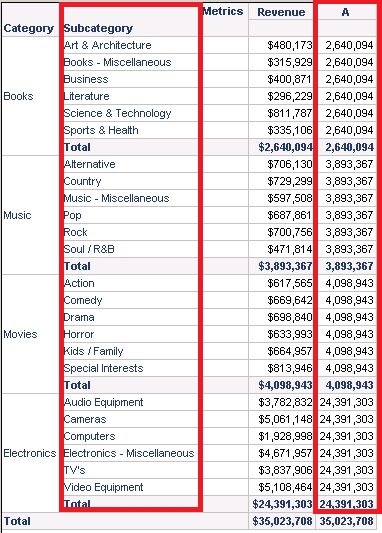
ka02R000000kVduQAE_0EM440000002CE8.jpeg

6. Go to Grid -> Options and hide the column of metric "A":
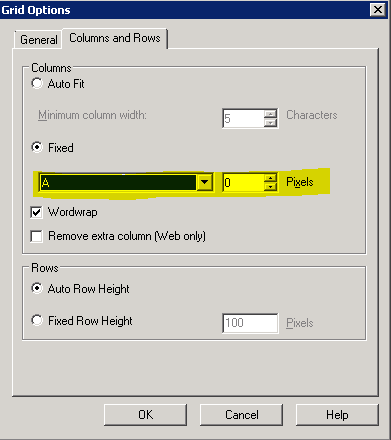
ka02R000000kVduQAE_0EM440000002CDt.jpeg

7. The final result is as below.

ka02R000000kVduQAE_0EM440000002CE9.jpeg


Comment

0 comments

Details

Knowledge Article

Published:

May 30, 2017

Last Updated:

May 30, 2017