EducationSoftwareStrategy.com
StrategyCommunity

Knowledge Base

Product

Community

Knowledge Base

TopicsBrowse ArticlesDeveloper Zone

Product

Download SoftwareProduct DocumentationSecurity Hub

Education

Tutorial VideosSolution GalleryEducation courses

Community

GuidelinesGrandmastersEvents
x_social-icon_white.svglinkedin_social-icon_white.svg
Strategy logoCommunity

© Strategy Inc. All Rights Reserved.

LegalTerms of UsePrivacy Policy
  1. Home
  2. Topics

KB20462: How to upgrade from MicroStrategy Enterprise Manager 8.x to MicroStrategy Enterprise Manager 9.x when performing a Complete Upgrade?


Community Admin

• Strategy


How to upgrade from MicroStrategy Enterprise Manager 8.x to MicroStrategy Enterprise Manager 9.x when performing a Complete Upgrade?

For information about changes made to Statistics Tables and Enterprise Manager Warehouse in Strategy version 9.x, refer to the following knowledge base document:
 
KB20531: What are the changes made to Statistics Tables and Enterprise Manager Warehouse Tables in MicroStrategy Enterprise Manager 9.0?
Upgrade of the Strategy Enterprise Manager environment essentially involves upgrades at the following three levels:
 

  • Upgrading Statistics
  • Upgrading Enterprise Manager Warehouse
  • Upgrading Enterprise Manager Metadata

The upgrade of Statistics and Enterprise Manager Warehouse can be a part of the Complete or Phased upgrade procedures, which are described below. Upgrade of the Strategy Enterprise Manager Project Metadata must be considered separately.
 
Complete Upgrade: All the Strategy Intelligence Servers being monitored by Strategy Enterprise Manager and also the Strategy Enterprise Manager Product are upgraded at the same time from 8.x to 9.x. The steps for a complete upgrade are discussed in this document.
 
Phased Upgrade: A hybrid environment of Strategy Intelligence Servers involving versions 9.x and 8.x should be maintained because Intelligence Servers will be upgraded in phases.
 
For information about steps to follow for the phased upgrade, refer to the following Strategy Knowledge Base document:
 
KB20731: How to upgrade from MicroStrategy Enterprise Manager 8.x to MicroStrategy Enterprise Manager 9.x when performing a Phased Upgrade
There are multiple levels of Statistics Tables and Enterprise Manager Warehouse upgrade. The various levels of Statistics upgrade and Enterprise Manager Warehouse upgrade are discussed in the following knowledge base documents:
 
KB20779: Levels of Statistics upgrade in MicroStrategy Enterprise Manager 9.0.0.
KB20780: Levels of Enterprise Manager Warehouse upgrade in MicroStrategy Enterprise Manager 9.0.0.
Before Strategy Enterprise Manager 8.x is upgraded to version 9.x, it is most critical to move all the Statistics data collected in format 8.x to the Enterprise Manager Warehouse. For seamless Enterprise Manager performance, complete the following steps when upgrading the Statistics database and Enterprise Manager product.
 

  • Close all user connections to ensure that there is no session activity on the Strategy Intelligence Servers 8.x being monitored by Strategy Enterprise Manager 8.x.
  • Run a Strategy Enterprise Manager Dataload with the current Enterprise Manager configuration. Be sure to check the 'Close orphan sessions' option.
  • Shutdown all the Strategy 8.x Intelligence Servers that are writing to the Statistics database and being monitored by Strategy Enterprise Manager 8.x.
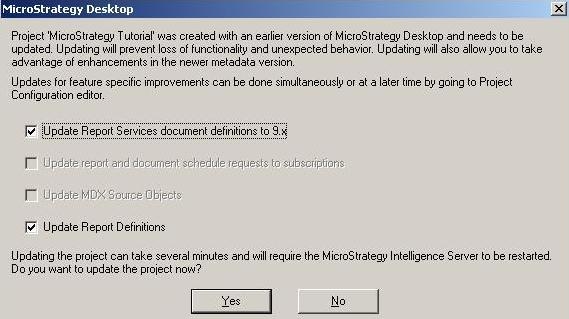
  • Upgrade the Strategy Intelligence Servers to version 9.x. In this step users are upgrading the metadata (being used by the Strategy Intelligence Servers) to version 9.x and also the individual projects (which are logging Statistics) in the metadata are upgraded to version 9.x. Users are prompted to upgrade the project to version 9.x when users connect to the project for the first time from Strategy Desktop 9.x. Users would see a message similar to what is shown below:
ka04W000000OhdfQAC_0EM440000002BAf.jpeg
  •  
    Note: For information about how to upgrade Strategy metadata from version 8.x to version 9.x, refer to the following knowledge base document:
     
  • KB20644: How to upgrade a MicroStrategy 8.1.x metadata repository and project definitions to MicroStrategy 9.0.0-


  • Upgrade the Strategy Enterprise Manager console to version 9.x.
  • After upgrading the software, backup the Strategy Enterprise Manager Warehouse database (containing the Statistics tables and Enterprise Manager Warehouse tables)
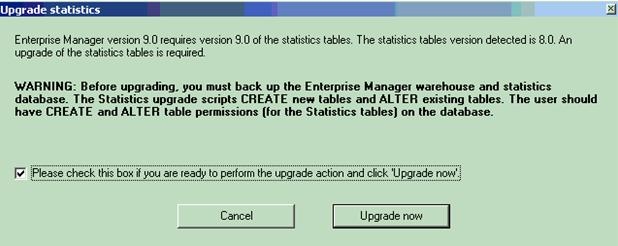
  • When users open Strategy Enterprise Manager console version 9.x for the first time, they will be prompted to first upgrade the Statistics tables as shown below:
ka04W000000OhdfQAC_0EM440000002BAo.jpeg
  •  
    Note: For the users to be prompted for a Statistics upgrade, the information under Tools > Options > DSN in the Enterprise Manager Console should be complete. If this information is blank, users will not be prompted for a Statistics upgrade upon launching the Enterprise Manager console. Therefore, it is important to ensure that this information is populated.
     
  • If the upgrade of Statistics is successful, users will get a pop-up showing that the upgrade was successful.
  • After the upgrade of Statistics tables, users will be prompted to upgrade the Strategy Enterprise Manager Warehouse tables to version 9.x, as shown below:
ka04W000000OhdfQAC_0EM440000002BAq.jpeg
  • If the upgrade of the Enterprise Manager Warehouse is successful, users will get a pop-up showing that the upgrade was successful.
  • Start all the Strategy Intelligence Servers 9.x.
  • Run a dataload from the newly updated Strategy Enterprise Manager 9.x console. While there is no new statistics data that needs to be migrated to the fact tables, this dataload is required to populate new Enterprise Manager Warehouse tables added in Strategy Enterprise Manager 9.x Warehouse tables.

Comment

0 comments

Details

Knowledge Article

Published:

May 5, 2017

Last Updated:

May 5, 2017