SYMPTOM:
When connecting to a MySQL 5.0 database using Strategy 9.x or 10.x on Linux, the connection fails with the following error:
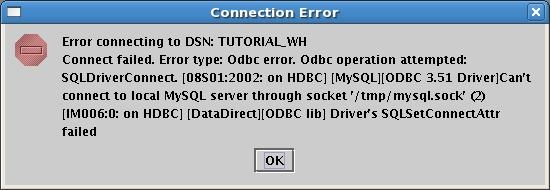
Connect failed. Error type: Odbc error. Odbc operation attempted: SQLDriverConnect. 523 92 Can't connect to local MySQL server through socket '/tmp/mysql.sock' (2) Driver's SQLSetConnectAttr failed
For more information on setting up DSNs to a MySQL 5.0 database on Linux, refer to the following Strategy Technical Notes:
CAUSE:
The data source name (DSN) entry in the odbc.ini file contains spaces in the 'Server' entry:
MYSQL_LABSTUTO=MySQL
Trace=0
TraceFile=odbctrace.out
TraceDll=/home/linux/8.0.3/install/lib32/odbctrac.so
InstallDir=/home/linux/8.0.3/install
IANAAppCodePage=106
UseCursorLib=0
Driver=/usr/lib/libmyodbc3.so
Description=MySQL ODBC 3.51 Driver DSN
Server = 10.11.12.13
Port=3306
Database=tutorial
Option=3
ACTION:
Remove the spaces from the 'Server' entry for the DSN in the odbc.ini file.
MYSQL_LABSTUTO=MySQL
Trace=0
TraceFile=odbctrace.out
TraceDll=/home/linux/8.0.3/install/lib32/odbctrac.so
InstallDir=/home/linux/8.0.3/install
IANAAppCodePage=106
UseCursorLib=0
Driver=/usr/lib/libmyodbc3.so
Description=MySQL ODBC 3.51 Driver DSN
Server=10.11.12.13
Port=3306
Database=tutorial
Option=3
