EducationSoftwareStrategy.com
StrategyCommunity

Knowledge Base

Product

Community

Knowledge Base

TopicsBrowse ArticlesDeveloper Zone

Product

Download SoftwareProduct DocumentationSecurity Hub

Education

Tutorial VideosSolution GalleryEducation courses

Community

GuidelinesGrandmastersEvents
x_social-icon_white.svglinkedin_social-icon_white.svg
Strategy logoCommunity

© Strategy Inc. All Rights Reserved.

LegalTerms of UsePrivacy Policy
  1. Home
  2. Topics

KB20471: How to change information associated with the license activation of a server installation in MicroStrategy 9.x


Community Admin

• Strategy


This KB discusses how to change information associated with server activation.

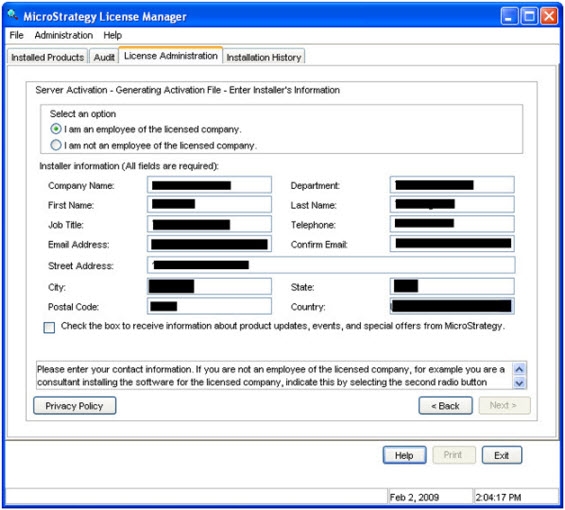
The following information is entered while activating any Strategy 9.x and newer server component:
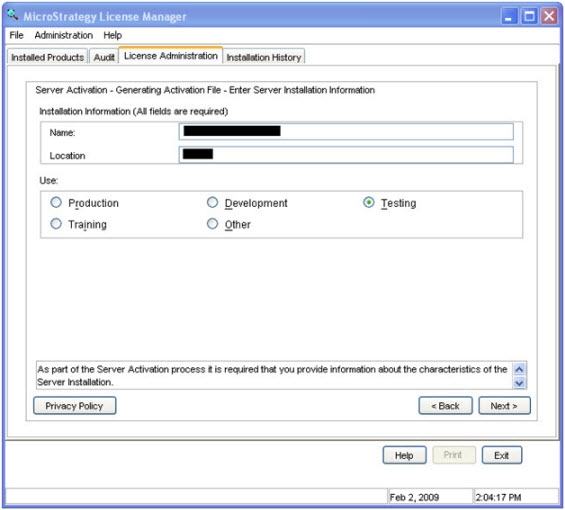
  • Installation information
    • Name
    • Location
  • Use (Production, Development, Testing, Training or Other)
ka04W000000OhldQAC_0EM440000002HV9.jpeg
  • Installer information
ka04W000000OhldQAC_0EM440000002HV8.jpeg
    • Company Name
    • Department
    • First Name
    • Last Name
    • Job Title
    • Telephone
    • Email Address
    • Street Address
    • City
    • State
    • Postal Code
    • Country

If any of this information needs to be changed after activating the server installation, the Strategy 9.x server component has to be deactivated and then reactivated. During the process of reactivation, the updated information can be entered.
 
Refer to the following Strategy Knowledge Base technical note for details on deactivating a server installation:
KB13455: How to deactivate a server installation in MicroStrategy 9.x


Comment

0 comments

Details

Knowledge Article

Published:

April 14, 2017

Last Updated:

April 14, 2017