EducationSoftwareStrategy.com
StrategyCommunity

Knowledge Base

Product

Community

Knowledge Base

TopicsBrowse ArticlesDeveloper Zone

Product

Download SoftwareProduct DocumentationSecurity Hub

Education

Tutorial VideosSolution GalleryEducation courses

Community

GuidelinesGrandmastersEvents
x_social-icon_white.svglinkedin_social-icon_white.svg
Strategy logoCommunity

© Strategy Inc. All Rights Reserved.

LegalTerms of UsePrivacy Policy
  1. Home
  2. Topics

KB204794 : How to apply transparency effect to an Information Window in MicroStrategy Mobile for iOS?


Community Admin

• Strategy


This article explains how to set the transparency for information windows in MicroStrategy Mobile for iOS. This setting is available beginning with MicroStrategy Mobile 9.4.1 Hotfix 3 for Windows Environments and 9.4.1 Hotfix 7 on Linux environments.

QUESTION:
How to apply transparency effect to an Information Window in Strategy Mobile for iOS?
For example, the transparency effect is used in the default Strategy Mobile configuration as seen below.

ka04W000000OfwyQAC_0EM440000002A2b.jpeg

 
ANSWER:
Starting in Strategy 9.4.1 Hotfix 3, the transparency effect has been introduced, and it can be applied to information windows. To set it up follow the next steps:
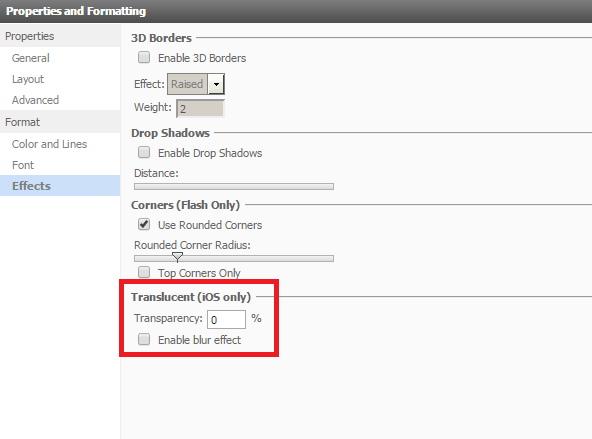
  • Create a document and add a Panel Stack that will work as an information window. In the information window options make sure the "Window mode" is not set to "Appear" or the effect won't apply.
  • Once the information window options are set, the "Effects" tab will show new option for "transparency" and "blur" effects, as shown below:
ka04W000000OfwyQAC_0EM440000002A2Y.jpeg

Note that this options will only be seen in Strategy Mobile and it can only set up starting in Strategy 9.4.1 Hotfix 3 for Windows Environments and 9.4.1 Hotfix 7 on Linux environments.
If the environment is upgrade from versions prior to 9.4.1 Hotfix 3, a metadata update is required for this option to work properly. Once hotfix 3 has been installed, MDUpdateUtil has to be run to update the projects. 


Comment

0 comments

Details

Knowledge Article

Published:

April 5, 2017

Last Updated:

July 17, 2017