EducationSoftwareStrategy.com
StrategyCommunity

Knowledge Base

Product

Community

Knowledge Base

TopicsBrowse ArticlesDeveloper Zone

Product

Download SoftwareProduct DocumentationSecurity Hub

Education

Tutorial VideosSolution GalleryEducation courses

Community

GuidelinesGrandmastersEvents
x_social-icon_white.svglinkedin_social-icon_white.svg
Strategy logoCommunity

© Strategy Inc. All Rights Reserved.

LegalTerms of UsePrivacy Policy
  1. Home
  2. Topics

KB204860: "Error in document results. You have included an invalid argument" error message appears when saving a document after disabling the ‘Allow users to access navigation bars and action menu’ option in MicroStrategy Web 9.4.1 HF3


Community Admin

• Strategy


In MicroStrategy Web 9.4.1 HF3, a new feature was introduced that allows users to access the navigation bars and action menu when the document is run in Full Screen mode for MicroStrategy Mobile for iOS 9.4.1 update 2 and above. However, in MicroStrategy Web 9.4.1 HF3, users receive an error message when saving the document after disabling the “Allow users to access navigation bars and action menu” option

SYMPTOM:
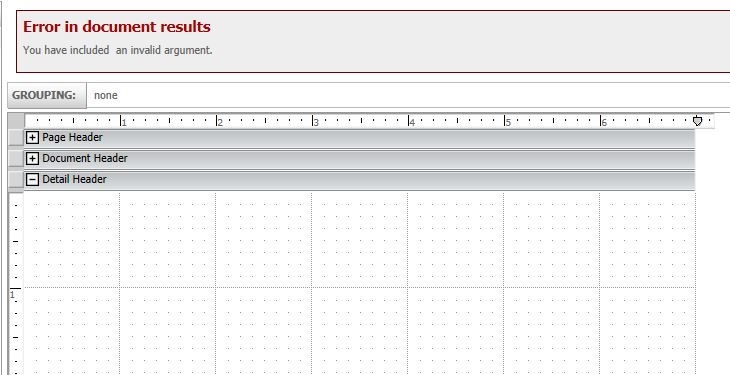
In Strategy Web 9.4.1 HF3, a new feature was introduced that allows users to access the navigation bars and action menu when the document is run in Full Screen mode for Strategy Mobile for iOS 9.4.1 update 2 and above. However, in Strategy Web 9.4.1 HF3, users receive an error message when saving the document after disabling the “Allow users to access navigation bars and action menu” option, like shown below.
 
In Design Mode:
ka04W000000ObyCQAS_0EM4400000025wC.jpeg


Error in document results
You have included an invalid argument.
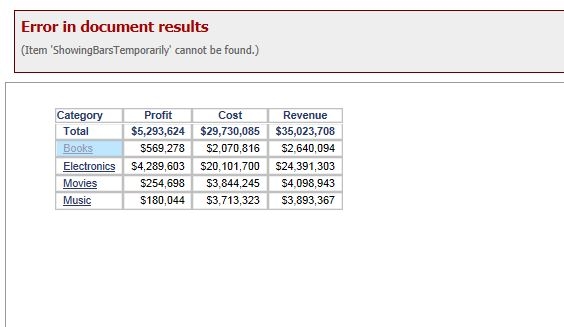
 
In Editable Mode:
 

ka04W000000ObyCQAS_0EM4400000025wA.jpeg


Error in document results
(Item 'ShowingBarsTemporarily' cannot be found.)
 
STEPS TO REPRODUCE:
In Strategy Tutorial:

  • Create a blank document.
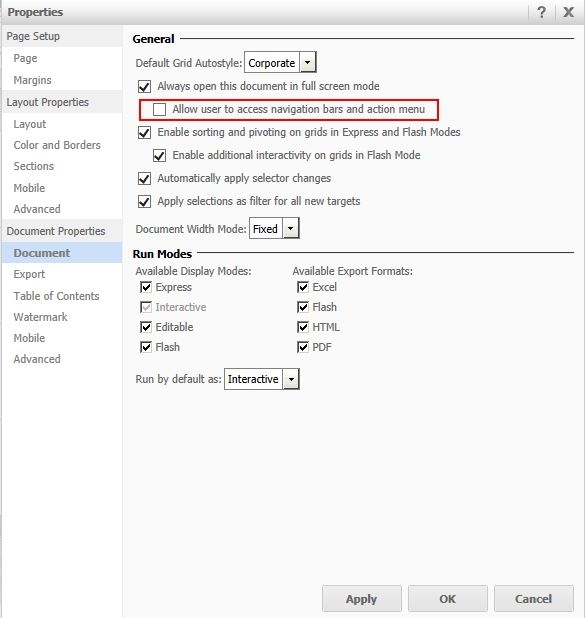
  • In Design mode, navigate to Tools > Document Properties.
  • Uncheck “Allow users to access navigation bars and action menu”, like shown below.
ka04W000000ObyCQAS_0EM4400000025w7.jpeg
  • Hit OK to close the window.
  • Save the document.
  • Notice the error message displays.

 
CAUSE:
This is a known issue in Strategy Web 9.4.1 HF 3. In order for the new feature “Allow users to access navigation bars and action menu” to work appropriately, a metadata upgrade is required.
 
ACTION:
Upgrade the metadata to 9.4.1 HF3 or above in order to take advantage of this new feature.


Comment

0 comments

Details

Knowledge Article

Published:

May 31, 2017

Last Updated:

May 31, 2017