Summary
Comma-delimited files exported from Strategy Web are not properly parsed into cells when opened in Microsoft Excel. This issue is expected behavior in MIcroStratgegy Web caused by default character encoding. The impact is limited to Strategy Web 9.x only when exporting reports to .csv format. This article describes the issue and the steps required to format .csv filed for use in MicroSoft Excel.
Description:
Users opening a report in .csv format will find that elements are not parsed into individual cells. Each line is rather concatenated and placed in the first cell of every row. Excel does not seem to recognize the delimiter.
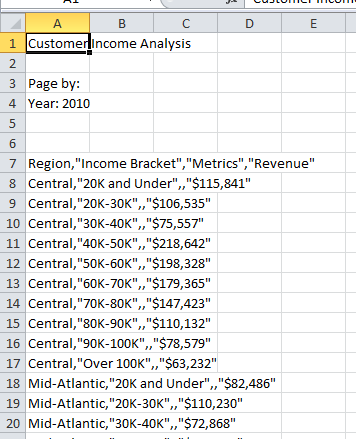
Steps to Reproduce:
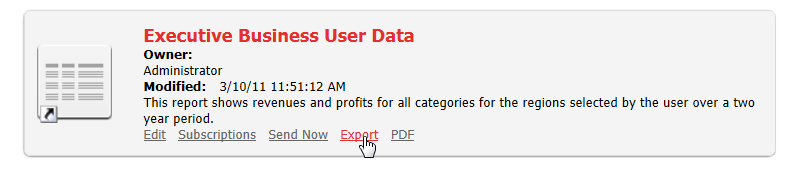
1. Choose grid in Strategy Web and select "Export"
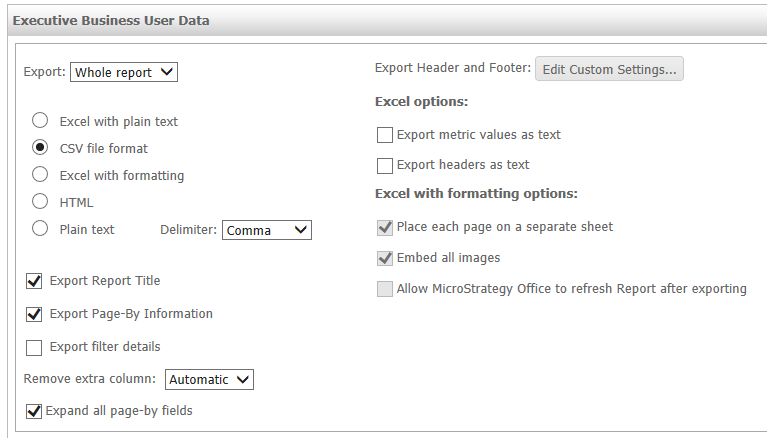
2. Select "CSV file format" and export
3. Open the exported file in Microsoft Excel. Individual elements will be concatenated and placed into the first column, rather than parsed into individual cells.
Cause
Reports exported in .csv format from Strategy Web are encoded in UTF-16LE by default. Microsoft Excel does not parse out individual variables into constituent cells when encoded in this format. An administrative setting is available at the project level to change the encoding of these files to UTF-8. Once encoded in UTF-8, Excel will separate the comma-delimited elements into different cells.
Action
The exported .csv file encoding can be changed at the project level by the Strategy Web Administrator. The Administrator must navigate to Preferences >> Project Defaults >> Export Reports, and select the option to “Encode CSV for exporting to Excel”. This will cause the Export Engine to encode .csv files in ISO-8859-1 when exported from Strategy Web. Note that ISO-8859-1 only supports 8-bit single-byte coded graphic character sets also known as Latin Alphabet No. 1. If there are character sets that are double bytes, such as the Japanese character sets, this checkbox should NOT be checked.
When this checkbox is not checked, the export engine will defer to the locales.xml file for reference on which encoding to use during export. locales.xml can be found in the Strategy Web directory's WEB-INF/xml folder.
Note that this only effects exported reports and has no effect on .csv files generated by Strategy Distribution Services.
Additional Troubleshooting:
If the action provided does not resolve this issue, please confirm that the file is exported with the same delimiter that Windows has set as its list seperator. This is set to comma (,) by default.
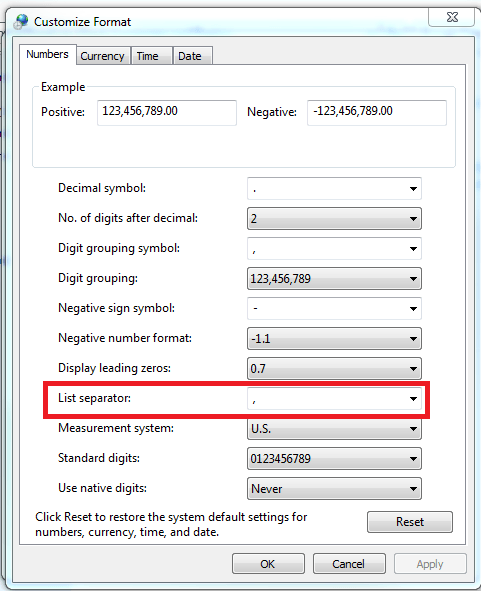
The "Customize Number Format" pane is found in different location for different versions of Windows. Please consult your Windows Administrator or the Microsoft Support for information on changing this setting.
