EducationSoftwareStrategy.com
StrategyCommunity

Knowledge Base

Product

Community

Knowledge Base

TopicsBrowse ArticlesDeveloper Zone

Product

Download SoftwareProduct DocumentationSecurity Hub

Education

Tutorial VideosSolution GalleryEducation courses

Community

GuidelinesGrandmastersEvents
x_social-icon_white.svglinkedin_social-icon_white.svg
Strategy logoCommunity

© Strategy Inc. All Rights Reserved.

LegalTerms of UsePrivacy Policy
  1. Home
  2. Topics

KB205032: The vertical axis label on a bubble graph widget is read top to bottom in MicroStrategy Web 9.4.1 and 10.x.


Community Admin

• Strategy


The vertical axis label on a bubble graph widget is read top to bottom in MicroStrategy Web 9.4.1 and 10.x.

SYMPTOM:
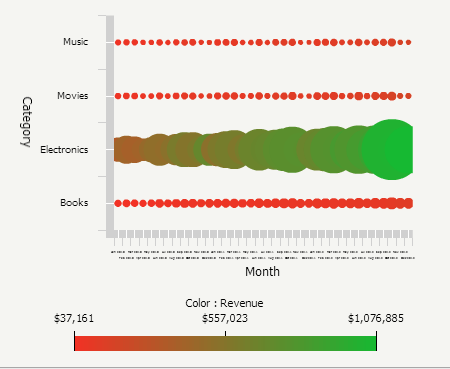
Users have the ability to configure a bubble graph widget in Strategy Web.  The vertical axis label on the bubble graph displays from top to bottom instead of the norm which is to read the vertical label from bottom to top.  The image below shows 'Category' being displayed from top to bottom.
ka04W000000Of0CQAS_0EM4400000025uJ.jpeg

 
STEPS TO REPRODUCE:

  1. Create a document with a grid. 
  2. Put Category and Month attributes and Profit and Revenue metrics on the grid.
  3. Change the grid to the widget of type Bubble Graph.
  4. Run the document in Interactive, Express, or Flash mode.  Notice that the vertical axis label is rotated 180 degrees from the norm and is read top to bottom.

 
CAUSE:
This is a known issue in Strategy Web 9.4.1 and 10.x.
 
ACTION:
Strategy will continue to investigate and post updates as soon as they are available.


Comment

0 comments

Details

Knowledge Article

Published:

June 16, 2017

Last Updated:

June 16, 2017