EducationSoftwareStrategy.com
StrategyCommunity

Knowledge Base

Product

Community

Knowledge Base

TopicsBrowse ArticlesDeveloper Zone

Product

Download SoftwareProduct DocumentationSecurity Hub

Education

Tutorial VideosSolution GalleryEducation courses

Community

GuidelinesGrandmastersEvents
x_social-icon_white.svglinkedin_social-icon_white.svg
Strategy logoCommunity

© Strategy Inc. All Rights Reserved.

LegalTerms of UsePrivacy Policy
  1. Home
  2. Topics

KB205088: Report Details do not display when running a document through MicroStrategy Office in Microsoft Excel.


Community Admin

• Strategy


In MicroStrategy Office 9.4.1, users can select to display Report Details, However, when the default Document run mode is set to "View" instead of "Flash", the Report Details still do not show when running a MicroStrategy document or dashboard

SYMPTOM:
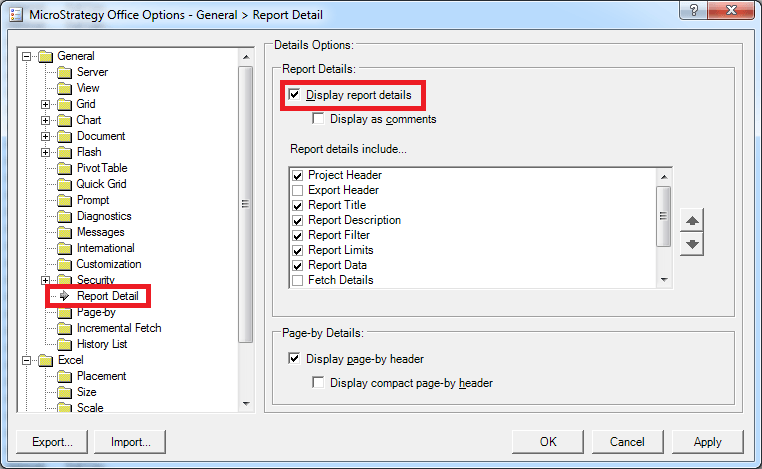
In Strategy Office 9.4.1, users can select to display Report Details, as shown in the Strategy Office Options below:
ka04W000000OgHxQAK_0EM4400000025uF.jpeg


ka04W000000OgHxQAK_0EM4400000025tz.jpeg

However, when the default Document run mode is set to "View" instead of "Flash", the Report Details still do not show when running a Strategy document or dashboard.
 
STEPS TO REPRODUCE:
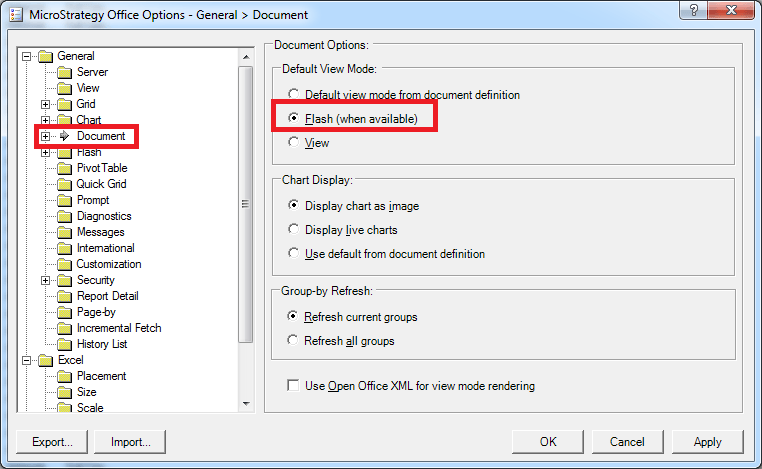
  • In the Strategy Office 9.4.1 Options > General > Document, set the Default View Mode to "Flash", as shown below:
ka04W000000OgHxQAK_0EM4400000025uH.jpeg
  • In the Strategy Office 9.4.1 Options > General > Report Detail, check "Display report details".
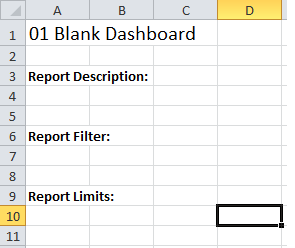
  • Execute a Strategy document. Notice the Report Detail headers appear, as shown below:
ka04W000000OgHxQAK_0EM4400000025tz.jpeg
  • In the Strategy Office 9.4.1 Options > General > Document, set the Default View Mode to "View", as shown below:
  • Execute the same document. Notice the Report Details no longer appear.

 
CAUSE:
This is a current limitation in Strategy Office 9.4.1. At this time, Report Details can only be viewed when the document is run in Flash mode. A request has been logged to allow Report Details to be displayed in View mode as well.
 
ACTION:
Contact Strategy Technical Support for an update on this issue.
 
WORKAROUND:
Execute the document in Flash mode instead of View mode.


Comment

0 comments

Details

Knowledge Article

Published:

June 15, 2017

Last Updated:

June 15, 2017