INTRODUCTION
To ensure Strategy 8.x Inbox is compatible with Strategy 9.x format, users must upgrade their 8.x Inbox using MJHLMGTR a utility introduced in Strategy 9.x to upgrade Strategy 8.x Inbox to Strategy 9.x format.
With the introduction of database based History List, MJHLMGTR is also used to migrate Inbox between file and database based systems. For information on database based History List, refer to the following Strategy Knowledge Base Document:
TN20506 - New Feature in Strategy 9.x: Database Based History List
For information on migrating Inbox files between file and database based systems, refer to the following Strategy Knowledge Base Document:
KB20511 - How to migrate Strategy Intelligence Server 9.x Inbox files between file based and database based system in a Windows environment.
The default location for this utility is:
C:\Program Files\Common Files\Strategy.
USAGE
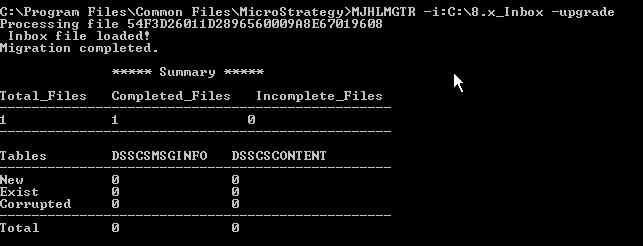
MJHLMGTR -i:inboxdirectory -upgrade
EXAMPLE
MJHLMGTR -i:C:\8.x_Inbox -upgrade -l:C:\8.x_Inbox
Note: The complete path to the Inbox files must be specified for inboxdirectory as the tool does not have the ability to read sub-folders of the Inbox directory.
If the inboxdirectory path is not complete the users will see "Migration Completed" with number of Completed Files = 0.
The following steps must be performed to update the user Inbox from Strategy 8.x to Strategy 9.x in a Windows environment:
For information on upgrading Strategy 8.x Inbox to Strategy 9.x Inbox in a Unix environment refer to the following Strategy Knowledge Base Document:
TN20510 - How to upgrade Strategy 8.x Inbox to Strategy 9.x Inbox in a Unix environment?
