SUMMARY:
This technical note describes the occurence of the issue while using Sybase IQ driver on Linux and provides an action for its resolution.
SYMPTOM:
Only the first character of each row returns when running queries in Strategy DB QueryTool 9.x installed on Linux against Sybase IQ 15.4:
Strategy ODBC Test Tool
[root@xxx ~]# cd /var/opt/MicroStrategy/bin
[root@xxx bin]# ./mstrtodbcx
Strategy ODBC Test Tool
Version 9.3.158.056

Type .help (including the period) for help.

- > .connect -d xxxxx -u xxxxx xxxxx
# Data Source Name: xxxxx
# Login: xxxxx
# Connection type : Strategy DB Classes

xxxxx > select * from xxxxx.DIM_GEO_COUNTRY;
# Query ran successfully
# Execution time: 0 ms.
There are 2 columns

#CRM_COUNTRY_ID CRM_COUNTRY_NAME
#--------------------
1 C
2 A
3 P
4 C
5 B
# 5 row(s) fetched
[root@xxx sybase]# dbisql -datasource=xxxxx -xxxxx
(CORP_MSTR_SBX)> select * from xxxxx.DIM_GEO_COUNTRY;
CRM_COUNTRY_ID
CRM_COUNTRY_NAME
1             Chile
2            Argentina
3             Peru
4             Colombia
5             Brasil
(5 rows)
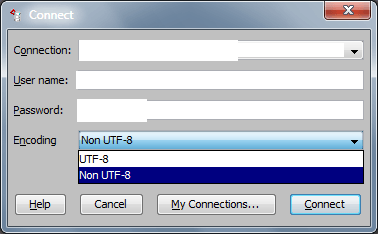
If using Strategy Developer or Strategy Web to display the characters, change the 'Character set encoding for Unix drivers’ setting (located at Database Connections > Advanced in Developer) to ‘Non UTF-8’ (the default is 'UTF-8') as shown on the screenshot below:

NOTE: The Sybase IQ driver on Windows is a UTF-16 driver so the ‘Character set encoding for Windows drivers’ setting can remain at its default value of 'Non UTF-8’.
