EducationSoftwareStrategy.com
StrategyCommunity

Knowledge Base

Product

Community

Knowledge Base

TopicsBrowse ArticlesDeveloper Zone

Product

Download SoftwareProduct DocumentationSecurity Hub

Education

Tutorial VideosSolution GalleryEducation courses

Community

GuidelinesGrandmastersEvents
x_social-icon_white.svglinkedin_social-icon_white.svg
Strategy logoCommunity

© Strategy Inc. All Rights Reserved.

LegalTerms of UsePrivacy Policy
  1. Home
  2. Topics

KB205100: Text inside an HTML Container will appear center-aligned vertically when exported to PDF in MicroStrategy Web.


Community Admin

• Strategy


When exporting a Report Services Dashboard that contains an HTML container to PDF in MicroStrategy Web, any text inside the HTML container is left and center aligned regardless of previous formatting.

SYMPTOM:
When exporting a Report Services Dashboard that contains an HTML container to PDF in Strategy Web 9.4.1, any text inside the HTML container is left and center aligned regardless of previous formatting, as shown below:
In Report Services Dashboard:

ka04W000000Odb0QAC_0EM4400000025tw.jpeg

In the exported PDF:

ka04W000000Odb0QAC_0EM4400000025tj.jpeg

 
CAUSE:
This is a known issue with Strategy Web 9.4.1.
ACTION:
This issue does not occur with Strategy 10.4. Upgrade to take advantage of the fix.
 
WORKAROUND:
The issue only seems to occur when creating a new Report Services Dashboard. Use a Report Services Document instead of a dashboard, like shown below.
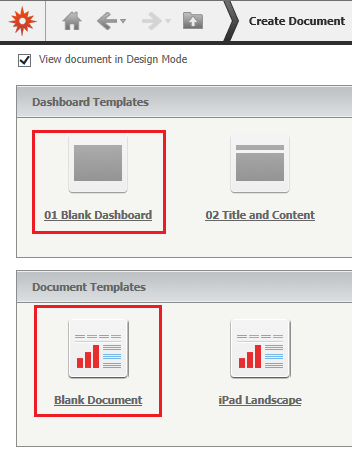
ka04W000000Odb0QAC_0EM4400000025tu.jpeg


Comment

0 comments

Details

Knowledge Article

Published:

April 13, 2017

Last Updated:

April 13, 2017