SYMPTOM
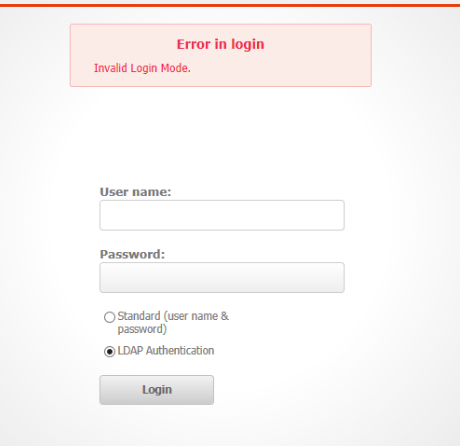
Users are unable to login to Strategy Web 9.x when using a link due to an “Invalid Login Mode” error. This issue only occurs when a link to a document or report is being used to connect to Strategy. After clicking the link the user is redirected to a login page but after entering the correct credentials there is an error displayed.
CAUSE
This error is caused due to a report or document that no longer exists in the metadata being referenced in the link. When a document or report link is created the object ID is embedded into the URL.
This most frequently occurs when users bookmark reports/documents after using them.
ACTION
Use a link that directs to the home page of the Strategy web installation.
For example if the link you are using is as follows:
http://localhost/MicroStrategy/asp/Main.aspx?evt=4058&src=Main.aspx.4058&reportViewMode=1&_subscriptionID=487E52694A24EDEC835E699AC5B8992B&server=WAS-VADUSUMILL4&Project=Enterprise%20Manager&port=0&share=1
Remove all the parameters beginning with “evt”:
http://localhost/MicroStrategy/asp/Main.aspx
